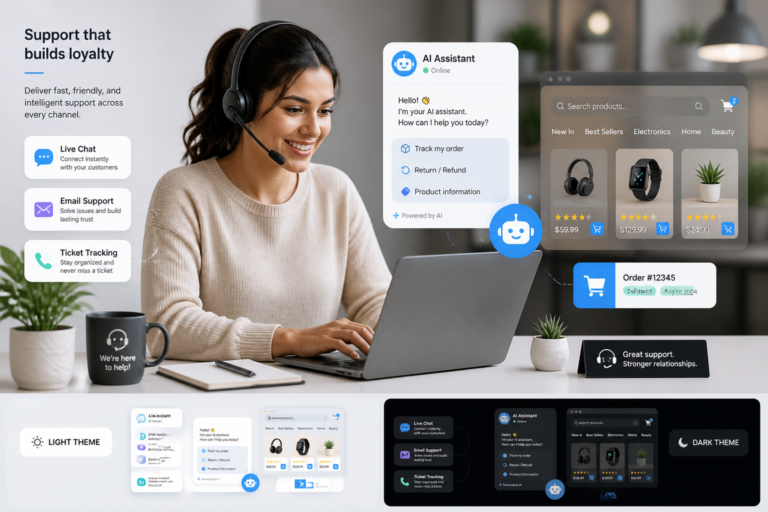
In today’s competitive eCommerce landscape, providing exceptional customer support is essential for any WooCommerce store. Customers expect quick responses and effective solutions, making the choice of support tools critical. One of the best ways to enhance your WooCommerce store’s customer support is by utilizing effective helpdesk apps. For instance, the Agentic Support Desk by XoBytes is an AI-powered solution designed specifically for WooCommerce stores. This app not only streamlines support processes but also improves customer satisfaction by providing timely assistance.
Moreover, incorporating a helpdesk app like Agentic Support Desk can significantly reduce response times and automate many repetitive tasks. As a result, your support team can focus on more complex inquiries, ultimately leading to a better customer experience. In this article, we will explore how to enhance your WooCommerce store customer support with effective helpdesk apps, focusing on key features, setup processes, and the benefits of using these tools.
Why Effective Helpdesk Apps Matter
Effective helpdesk apps play a crucial role in managing customer inquiries. They allow you to centralize support requests, making it easier to track and resolve issues. Additionally, these apps often come with features that automate responses, categorize tickets, and provide analytics to help improve your support strategy.
Key Features of Helpdesk Apps
To choose the right helpdesk app for your WooCommerce store, consider the following features:
- Ticket Management: Efficiently track and manage customer inquiries.
- Live Chat: Provide real-time support to customers visiting your site.
- Multi-Channel Support: Handle inquiries from various platforms, including social media and email.
- Automation: Automate responses to common questions and streamline workflows.
- Knowledge Base Integration: Offer self-service options for customers to find answers quickly.
- Seamless WooCommerce Integration: Ensure the helpdesk app works smoothly with your WooCommerce store.
How to Set Up a Helpdesk App for WooCommerce
Setting up a helpdesk app like Agentic Support Desk is straightforward. Here’s a step-by-step guide:
- Choose Your Helpdesk App: Select an app that meets your needs, such as Agentic Support Desk.
- Install the Plugin: Download and install the app from your WooCommerce dashboard.
- Configure Settings: Adjust the settings to align with your support processes, including ticket categories and automation rules.
- Integrate with WooCommerce: Ensure seamless integration by connecting the helpdesk app with your WooCommerce store.
- Train Your Team: Familiarize your support team with the new system to maximize efficiency.
By following these steps, you can effectively set up a helpdesk app that enhances your customer support capabilities.
Benefits of Using Helpdesk Apps for WooCommerce
Utilizing a dedicated helpdesk app offers numerous advantages:
- Improved Response Times: Quickly address customer inquiries, reducing wait times.
- Centralized Inquiries: Manage all support requests from one platform, making it easier to track and resolve issues.
- Enhanced Customer Satisfaction: Provide timely and effective support, leading to happier customers.
- Increased Efficiency: Automate repetitive tasks, allowing your support team to focus on more complex issues.
- Analytics and Reporting: Gain insights into support performance and identify areas for improvement.
Who Should Use Helpdesk Apps?
Helpdesk apps are ideal for:
- WooCommerce store owners looking to enhance their customer support.
- Businesses aiming to streamline support workflows and improve efficiency.
- Teams that handle a high volume of customer inquiries and need a system to manage them effectively.
However, smaller businesses with minimal customer inquiries may not find the need for a dedicated helpdesk app.
Conclusion
In conclusion, enhancing your WooCommerce store’s customer support with effective helpdesk apps is essential for success in today’s eCommerce environment. By utilizing solutions like the Agentic Support Desk, you can significantly improve your response times, automate workflows, and ultimately boost customer satisfaction. Don’t hesitate to explore these tools and take your customer support to the next level!
Related XoBytes Products

Agentic Support Desk for WordPress by XoBytes.com
$19.99
Agentic Support Desk by Xobytes is an AI-powered WordPress support desk built for software sellers, WooCommerce stores, agencies,…

Agentic Consultant, Product Rep, & Customer Service Agent By XoBytes.com
$19.99
Agentic Consultant for WordPress gives your website a smart AI product rep, customer service agent, and hands-free voice…

Upgrades, Packages & Tiers for WooCommerce By XoBytes.com
$25.00
This is a FREEMIUM plugin. Get the free version “Upgrades, Packages & Tiers for WooCommerce By XoBytes.com” Pro…
License manager for WooCommerce by XoBytes.com
$25.00
Xobytes License Manager for WooCommerce is a powerful WooCommerce license manager plugin that lets you sell software licenses,…

Tamper Guard by XoBytes | WordPress Plugin Tamper Detector
$25.00
Protect your commercial WordPress plugins with license-based tamper detection, file integrity monitoring, automatic shutdown protection, and site reporting.…

Agentic Construction Theme | More than just a theme | Built for all trades
$49.99
Why You Need This Theme And Plugin! Click here for the Demo Agentic Construction Theme by XoBytes is…
Product 1 of 6
Choosing the Right Helpdesk App for Your WooCommerce Store
When it comes to selecting a helpdesk app for your WooCommerce store, it’s essential to evaluate your specific needs and the unique features offered by different solutions. Here are some factors to consider:
For additional authoritative context, review LinkedIn.
- Scalability: Ensure the app can grow with your business. Look for features that allow you to easily add more agents or support channels as your customer base expands.
- Customization: Choose an app that allows customization of workflows, ticket statuses, and automated responses to fit your business model.
- Integration with Other Tools: Consider how well the helpdesk app integrates with other tools you use, such as CRM systems, email marketing platforms, and social media management tools.
- User Experience: A user-friendly interface is crucial for both your support team and customers. Look for apps with intuitive designs that facilitate easy navigation.
- Cost: Assess your budget and compare pricing plans. Some apps offer tiered pricing based on features, while others may charge per agent or ticket.
Practical Examples of Helpdesk Apps for WooCommerce
To give you a clearer picture of what’s available, here are a few popular helpdesk apps that integrate seamlessly with WooCommerce:
Continue with Best WooCommerce Helpdesk Apps to Streamline Customer Support in 2026 for additional XoBytes guidance.
- Zendesk: Known for its robust ticket management system and extensive reporting capabilities, Zendesk offers multi-channel support and can be integrated with various eCommerce platforms.
- Freshdesk: This app provides an easy-to-use interface, automation features, and a knowledge base for self-service support. Freshdesk is particularly beneficial for teams that handle high volumes of inquiries.
- Help Scout: Focused on providing a personal touch, Help Scout allows for email-based support and offers features like shared inboxes and customer profiles to enhance customer interactions.
Implementation Steps for Helpdesk Apps
Once you’ve chosen a helpdesk app, implementing it effectively is crucial. Here’s a detailed guide:
- Define Your Support Goals: Before implementation, clarify what you want to achieve with the helpdesk app. Whether it’s reducing response times or improving customer satisfaction, having clear goals will guide your setup.
- Set Up User Roles: Assign roles and permissions to your support team members according to their responsibilities. This ensures that everyone has access to the tools they need without compromising security.
- Customize Workflows: Tailor the app’s workflows to match your support processes. Create ticket categories, set up automated responses for common inquiries, and establish escalation paths for complex issues.
- Conduct Training Sessions: Organize training for your support team to familiarize them with the new system. Highlight the app’s features and best practices for efficient use.
- Monitor Performance: After implementation, keep an eye on key performance indicators (KPIs) such as response times, ticket resolution rates, and customer satisfaction scores. Use this data to make necessary adjustments.
Comparing Helpdesk Apps: A Quick Overview
To help you make an informed decision, here’s a quick comparison of some popular helpdesk apps:
| Feature | Zendesk | Freshdesk | Help Scout |
|---|---|---|---|
| Ticket Management | Yes | Yes | Yes |
| Live Chat | Yes | Yes | No |
| Multi-Channel Support | Yes | Yes | Yes |
| Automation | Advanced | Moderate | Basic |
| Knowledge Base Integration | Yes | Yes | Yes |
By comparing these features, you can better understand which helpdesk app aligns with your WooCommerce store’s needs.
Frequently Asked Questions
Here are some common questions about WooCommerce support apps:
- What are the key features to look for in a WooCommerce support app?
Key features include ticket management, live chat, multi-channel support, automation, knowledge base integration, and seamless WooCommerce integration. - How do I integrate a support app with my WooCommerce store?
Most support apps provide plugin options or API integrations that connect directly with WooCommerce. Follow the setup guides provided by the support app to ensure proper configuration. - What are the benefits of using a dedicated support app for WooCommerce?
Dedicated support apps improve response times, automate support workflows, centralize inquiries, and enhance overall customer satisfaction, leading to increased loyalty and sales.