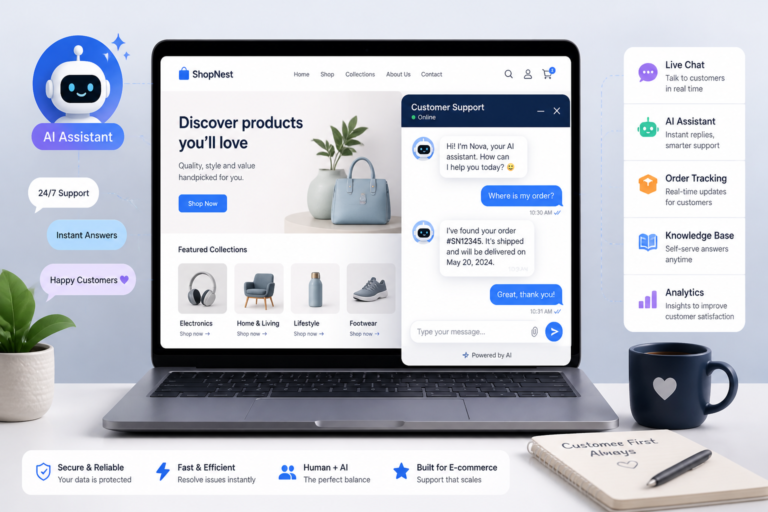
In the fast-paced world of eCommerce, providing exceptional customer support is essential for success. Therefore, having the right tools can significantly enhance your WooCommerce store’s service capabilities. One such tool is the Agentic Consultant, Product Rep, & Customer Service Agent by XoBytes. This innovative AI product rep serves as a hands-free voice assistant, helping you deliver smart customer service seamlessly.
Choosing the best WooCommerce support plugins is crucial for improving customer satisfaction and streamlining support workflows. In this guide, we will explore key features, setup tips, and pricing for various plugins, helping you make an informed decision for your online store.
Why Customer Support is Vital for WooCommerce Stores
Providing excellent customer service can directly impact your store’s reputation and sales. Customers today expect quick, reliable support. If they encounter issues, they want prompt assistance. By choosing the right support plugins, you can ensure that your customers receive the help they need when they need it.
Key Features to Look for in WooCommerce Support Plugins
When selecting support plugins, consider the following features that can enhance your customer service experience:
- Live Chat: Instant communication with customers can resolve issues quickly.
- Ticket Management: Organizes customer inquiries and tracks their status efficiently.
- Automation: Automate responses and ticket routing to streamline workflow.
- Knowledge Base Integration: Provides customers with self-service options to find answers quickly.
- CRM Compatibility: Integrates with your existing customer relationship management tools.
- Support Analytics: Helps you track performance metrics and improve service quality.
Top WooCommerce Support Plugins for Your Store
To make this easier, here are some of the best WooCommerce support plugins available:
- Agentic Support Desk: An AI-powered support desk that automates customer service and integrates with various platforms.
- Zendesk for WooCommerce: A popular choice for managing customer support tickets and inquiries across multiple channels.
- LiveChat: Offers real-time chat capabilities, enhancing customer engagement and satisfaction.
- WooCommerce Support Ticket System: A straightforward solution for handling customer inquiries and support tickets.
- Help Scout: Provides a shared inbox for customer support teams and integrates seamlessly with WooCommerce.
How to Set Up a WooCommerce Support Plugin
Setting up a support plugin can seem daunting, but following these steps can simplify the process:
- Choose Your Plugin: Select a plugin that meets your needs based on the features listed above.
- Install the Plugin: Download and install the plugin through your WordPress dashboard.
- Configure Settings: Customize the plugin settings to fit your store’s requirements and branding.
- Train Your Team: Ensure your support team understands how to use the plugin effectively.
- Test the System: Conduct tests to ensure everything is functioning correctly before going live.
Benefits of Using the Agentic Consultant
The Agentic Consultant is an excellent choice for WooCommerce store owners looking to enhance their customer support capabilities. Here are some key benefits:
- AI-Powered Assistance: Provides instant responses to customer inquiries, improving response times.
- Hands-Free Operation: Functions as a voice assistant, allowing for a more interactive customer experience.
- Seamless Integration: Works well with existing WooCommerce setups, making implementation straightforward.
- Cost-Effective Solution: Priced at just $19.99, it offers great value for the features included.
Who Should Use These Plugins?
While these support plugins are beneficial for most WooCommerce stores, they are particularly advantageous for:
- Stores with high customer interaction and inquiries.
- Businesses looking to automate customer support processes.
- Companies aiming to enhance customer satisfaction and loyalty.
However, businesses with minimal customer interactions may not require extensive support plugins.
Conclusion
Choosing the right WooCommerce support plugins can significantly enhance your customer service experience. By integrating tools like the Agentic Consultant, you can streamline workflows, improve response times, and ultimately boost customer satisfaction. Start exploring your options today!
Practical Examples of WooCommerce Support Plugin Implementations
To better understand how the best WooCommerce support plugins can enhance your online store, let’s look at a few practical examples of successful implementations:
Case Study: A Fashion Retailer
A fashion retailer integrated the LiveChat plugin into their WooCommerce store. By providing real-time assistance, they were able to reduce cart abandonment rates by 30%. The plugin allowed their support team to proactively engage with customers browsing high-value items, answering questions and offering personalized recommendations.
Case Study: An Electronics Store
An electronics store utilized the Zendesk for WooCommerce to manage customer inquiries more effectively. By implementing a ticket management system, they improved their response times by 50%. The store also created a comprehensive knowledge base that empowered customers to find answers independently, which further reduced the volume of incoming tickets.
Comparison of Popular WooCommerce Support Plugins
When choosing between various support plugins, it’s helpful to compare their features side by side. Here’s a brief comparison of the top options:
For additional authoritative context, review Facebook.
| Plugin | Live Chat | Ticket Management | Automation | Knowledge Base | CRM Integration |
|---|---|---|---|---|---|
| Agentic Support Desk | ✔️ | ✔️ | ✔️ | ✔️ | ✔️ |
| Zendesk for WooCommerce | ✔️ | ✔️ | ✔️ | ✔️ | ✔️ |
| LiveChat | ✔️ | ❌ | ✔️ | ❌ | ✔️ |
| WooCommerce Support Ticket System | ❌ | ✔️ | ❌ | ❌ | ❌ |
| Help Scout | ✔️ | ✔️ | ✔️ | ✔️ | ✔️ |
Implementation Steps for WooCommerce Support Plugins
Once you’ve selected the right support plugin, follow these implementation steps to ensure a smooth setup:
Related XoBytes Products

Agentic Consultant, Product Rep, & Customer Service Agent By XoBytes.com
$19.99
Agentic Consultant for WordPress gives your website a smart AI product rep, customer service agent, and hands-free voice…

Agentic Support Desk for WordPress by XoBytes.com
$19.99
Agentic Support Desk by Xobytes is an AI-powered WordPress support desk built for software sellers, WooCommerce stores, agencies,…

Agentic Construction Theme | More than just a theme | Built for all trades
$49.99
Why You Need This Theme And Plugin! Click here for the Demo Agentic Construction Theme by XoBytes is…

Upgrades, Packages & Tiers for WooCommerce By XoBytes.com
$25.00
This is a FREEMIUM plugin. Get the free version “Upgrades, Packages & Tiers for WooCommerce By XoBytes.com” Pro…

Tamper Guard by XoBytes | WordPress Plugin Tamper Detector
$25.00
Protect your commercial WordPress plugins with license-based tamper detection, file integrity monitoring, automatic shutdown protection, and site reporting.…

AI SEO Data & Automatic Blog Writer for WordPress by XoBytes
$19.99
Turn your WordPress site, Google Search Console data, and SEO opportunities into smarter blog posts, pages, titles, meta…
Product 1 of 6
- Backup Your Site: Before making any changes, ensure you have a complete backup of your WooCommerce store.
- Install the Plugin: Navigate to your WordPress dashboard, go to Plugins, and click Add New. Search for your chosen plugin and click Install Now.
- Activate the Plugin: Once installed, activate the plugin to begin configuration.
- Configure Settings: Access the plugin settings from your dashboard and customize options such as chat appearance, ticket categories, and notification preferences.
- Train Your Team: Provide training sessions for your support team to familiarize them with the new tools and workflows.
- Monitor Performance: After going live, regularly check the analytics provided by the plugin to assess performance and make necessary adjustments.
Decision Criteria for Choosing the Right Plugin
When selecting a WooCommerce support plugin, consider the following decision criteria:
Continue with How to Choose the Best WooCommerce Customer Support Plugin for Your Store for additional XoBytes guidance.
- Feature Set: Ensure the plugin offers the features that align with your customer support strategy.
- User Experience: Look for plugins that provide an intuitive interface for both customers and support staff.
- Integration Capabilities: Check if the plugin integrates smoothly with your existing tools, such as CRM systems and email marketing platforms.
- Scalability: Choose a plugin that can grow with your business, accommodating increased customer interactions as your store expands.
- Customer Support: Evaluate the level of support provided by the plugin developers, including documentation and direct assistance.
Common Challenges When Implementing Support Plugins
While integrating WooCommerce support plugins can greatly enhance customer service, there are common challenges that store owners may face. Understanding these challenges can help you prepare and mitigate potential issues:
- Technical Compatibility: Not all plugins work seamlessly with every theme or existing plugin. Ensure compatibility before installation.
- Training Requirements: Your support team may require training to effectively use new tools, which can take time and resources.
- Over-Reliance on Automation: While automation is beneficial, it can lead to a lack of personal touch in customer interactions if not balanced correctly.
- Ongoing Maintenance: Regular updates and maintenance are essential to ensure the plugin functions optimally and remains secure.
Advanced Features to Enhance Customer Support
When evaluating the best WooCommerce support plugins, consider looking for advanced features that can take your customer service to the next level:
- Multi-Channel Support: Choose plugins that allow communication through various channels such as email, social media, and SMS.
- Customizable Workflows: Look for options that let you tailor workflows to fit your business needs, enhancing efficiency.
- AI-Powered Insights: Some plugins offer AI analytics that provide insights into customer behavior, helping you tailor your support strategies.
- Mobile Compatibility: Ensure that your support plugin is mobile-friendly, allowing your team to respond to inquiries on-the-go.
Evaluating Plugin Performance
Once your support plugin is in place, it’s crucial to evaluate its performance regularly. Here are some metrics to consider:
- Response Time: Measure the average time taken to respond to customer inquiries.
- Resolution Rate: Track the percentage of issues resolved on the first contact.
- Customer Satisfaction Scores: Use surveys to gauge customer satisfaction with the support received.
- Ticket Volume Trends: Analyze ticket volume over time to identify peak periods and adjust staffing accordingly.
Future Trends in WooCommerce Customer Support
Staying ahead of the curve is essential for maintaining a competitive edge in eCommerce. Here are some future trends in customer support that may impact your choice of plugins:
- Increased Use of AI: Expect more plugins to incorporate AI for predictive analytics and personalized customer interactions.
- Omni-Channel Support: Customers will increasingly expect seamless support across multiple channels, necessitating plugins that can integrate these experiences.
- Focus on Self-Service: More stores will adopt knowledge base features, allowing customers to find answers independently, reducing the load on support teams.
- Enhanced Security Features: With growing concerns over data privacy, plugins will need to prioritize secure communication and data handling.
Frequently Asked Questions
Here are some common questions about choosing WooCommerce support plugins:
- What are the key features to look for in WooCommerce customer support plugins?
- Key features include live chat, ticket management, automation, knowledge base integration, CRM compatibility, and support analytics.
- How do I choose the best support plugin for my WooCommerce store?
- Consider your support needs, budget, ease of setup, integration capabilities, and user reviews. Prioritize plugins that offer automation and seamless WooCommerce integration.
- Can support plugins automate customer inquiries and ticket handling?
- Yes, many support plugins include automation features such as auto-responders, ticket routing, and support workflows to streamline customer service.
- Are there support plugins that integrate with AI chatbots?
- Yes, some plugins like Agentic Support Desk can integrate with AI chatbots to provide instant responses and reduce support team workload.