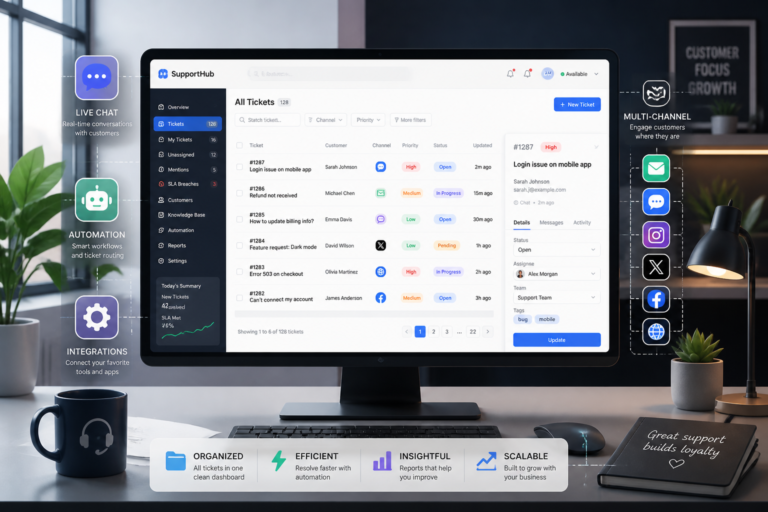
In today’s fast-paced digital landscape, choosing the right ticket support plugin for your WordPress site is essential. As customer expectations rise, businesses must adapt by implementing efficient support systems. This guide will help you understand how to select the best ticket support plugin for WordPress in 2026, focusing on key features, setup tips, and optimizing workflows.
Understanding Ticket Support Plugins
Ticket support plugins are designed to streamline customer service operations. These plugins allow businesses to manage inquiries, resolve issues, and enhance communication with customers. Moreover, they provide tools for tracking and organizing support requests, which can significantly improve response times and customer satisfaction.
Key Features to Look For
When selecting a ticket support plugin, consider the following features:
- Ticket Management: A robust ticket management system allows you to track, prioritize, and resolve customer requests efficiently.
- Automation: Automation features can help streamline repetitive tasks, saving time and reducing errors.
- Multi-Channel Support: Look for plugins that offer support across multiple channels, such as email, chat, and social media.
- Knowledge Base Integration: Incorporating a knowledge base can empower customers to find answers independently.
- Easy Setup: Choose a plugin that is simple to install and configure, allowing you to start providing support quickly.
Top Ticket Support Plugins for WordPress in 2026
To make your selection easier, here are some of the best ticket support plugins available:
- Agentic Support Desk: This AI-powered plugin offers advanced features, including automated ticket routing and customer interaction tracking.
- WP Support Plus: Known for its user-friendly interface, WP Support Plus provides customizable ticket forms and email notifications.
- Zendesk for WordPress: Integrating seamlessly with Zendesk, this plugin offers powerful support features and analytics.
- Freshdesk: With multi-channel support and automation capabilities, Freshdesk is a popular choice for businesses of all sizes.
For example, Agentic Support Desk is an excellent option that combines AI capabilities with user-friendly features. It’s designed to enhance customer service efficiency and improve response times.
Setting Up Your Ticket Support Plugin
Once you select a plugin, follow these steps to set it up effectively:
- Install the Plugin: Navigate to the WordPress dashboard, select ‘Plugins,’ and then ‘Add New.’ Search for your chosen plugin and click ‘Install.’
- Configure Settings: After installation, configure the settings to match your business needs. This may include setting up ticket forms, notifications, and user permissions.
- Integrate with Other Tools: If applicable, integrate your ticket support plugin with other tools like CRM systems or knowledge bases.
- Test the System: Before going live, conduct tests to ensure everything functions as expected.
Optimizing Support Workflows
After setting up your ticket support plugin, it’s important to optimize your support workflows. In addition, consider the following strategies:
- Regular Training: Provide ongoing training for your support team to ensure they are familiar with the plugin’s features.
- Monitor Performance: Use analytics tools to track ticket resolution times and customer satisfaction ratings.
- Gather Feedback: Regularly solicit feedback from customers to identify areas for improvement.
To learn more about the importance of selecting the right tools, check out our article on how to choose the best WordPress support plugins for your business.
Comparing Ticket Support Plugins
When selecting a ticket support plugin, it’s beneficial to compare different options based on specific criteria. Here’s a structured approach to help you make an informed decision:
Criteria for Comparison
- Pricing: Evaluate the cost of each plugin, including any additional fees for premium features or support.
- User Experience: Assess the user interface for both your support team and your customers. A clean, intuitive design can enhance efficiency.
- Customization Options: Look for plugins that allow you to customize ticket forms, notifications, and user roles to fit your specific needs.
- Integration Capabilities: Ensure the plugin can integrate with other tools you use, such as CRM systems, email marketing platforms, and e-commerce solutions.
- Support and Documentation: Check if the plugin offers reliable customer support and comprehensive documentation to assist with setup and troubleshooting.
Practical Example: Feature Comparison
Let’s take a closer look at how two popular plugins, Agentic Support Desk and WP Support Plus, stack up against each other:
| Feature | Agentic Support Desk | WP Support Plus |
|---|---|---|
| AI-Powered Automation | Yes | No |
| Multi-Channel Support | Yes | Limited to Email |
| Customizable Ticket Forms | Yes | Yes |
| Analytics and Reporting | Advanced | Basic |
| Knowledge Base Integration | Yes | No |
Implementation Steps for Effective Use
Once you have chosen a ticket support plugin, follow these implementation steps to ensure you maximize its potential:
1. Define Your Support Workflow
Before diving into the technical setup, outline your support workflow. Consider the following:
- How will tickets be categorized?
- Who will handle different types of inquiries?
- What is the expected response time for each category?
Related XoBytes Products

Agentic Support Desk for WordPress by XoBytes.com
$19.99
Agentic Support Desk by Xobytes is an AI-powered WordPress support desk built for software sellers, WooCommerce stores, agencies,…

Tamper Guard by XoBytes | WordPress Plugin Tamper Detector
$25.00
Protect your commercial WordPress plugins with license-based tamper detection, file integrity monitoring, automatic shutdown protection, and site reporting.…

Agentic Consultant, Product Rep, & Customer Service Agent By XoBytes.com
$19.99
Agentic Consultant for WordPress gives your website a smart AI product rep, customer service agent, and hands-free voice…
2. Customize Your Settings
After defining your workflow, customize the plugin settings:
- Set up ticket categories and priorities.
- Configure email notifications for both customers and support agents.
- Establish user roles and permissions to ensure proper access control.
3. Create a Knowledge Base
Consider creating a knowledge base that addresses common queries. This can:
- Reduce the volume of tickets.
- Empower customers to find answers independently.
- Enhance overall customer satisfaction.
4. Monitor and Adjust
Once your ticket support system is live, continuously monitor its performance:
- Analyze ticket resolution times and customer feedback.
- Adjust workflows and settings based on performance data.
- Regularly update your knowledge base to reflect new information and frequently asked questions.
Making the Final Decision
Choosing the right ticket support plugin is a significant step towards enhancing your customer service. As you weigh your options, consider not only the features and pricing but also how well each plugin aligns with your business goals and customer expectations. A well-chosen plugin can streamline your support process, enhance customer satisfaction, and ultimately contribute to your business’s success.
Continue with Essential WordPress Support Plugins to Enhance Customer Service Workflows for additional XoBytes guidance.
Practical Examples of Ticket Support Workflows
To better understand the implementation of a ticket support plugin, let’s explore a few practical examples of ticket workflows that can be adapted based on different business models:
Example 1: E-commerce Business
- Ticket Categories: Order Issues, Product Inquiries, Returns, and Refunds.
- Workflow: Tickets are automatically categorized based on keywords. Customer service agents are assigned tickets based on their expertise.
- Response Time: Set a standard response time of 24 hours for all inquiries, with priority given to order issues.
Example 2: SaaS Company
- Ticket Categories: Technical Support, Billing Questions, Feature Requests.
- Workflow: Use automation to route technical issues to specialized support agents. Feature requests can be compiled for quarterly reviews.
- Response Time: Aim for a 1-hour response time for technical support tickets, while billing questions can have a 48-hour response window.
Advanced Comparison of Ticket Support Plugins
When comparing ticket support plugins, consider creating a detailed comparison chart to visualize the differences. Here’s an example of how you might structure this:
| Feature | Agentic Support Desk | WP Support Plus | Zendesk for WordPress |
|---|---|---|---|
| AI-Powered Automation | Yes | No | Yes |
| Multi-Channel Support | Yes | Limited to Email | Yes |
| Customizable Ticket Forms | Yes | Yes | Yes |
| Analytics and Reporting | Advanced | Basic | Advanced |
| Knowledge Base Integration | Yes | No | Yes |
Implementation Steps for Continuous Improvement
Once your ticket support plugin is operational, consider these steps for ongoing improvement:
- Regularly Review Support Metrics: Analyze data on ticket resolution times, customer satisfaction scores, and ticket volume trends.
- Solicit Internal Feedback: Encourage your support team to provide feedback on the plugin’s usability and any challenges faced.
- Stay Updated: Regularly check for updates to your ticket support plugin to ensure you’re utilizing the latest features and security enhancements.
- Engage with the Community: Participate in forums or user groups related to your chosen plugin to share experiences and learn from others.
Key Considerations for Long-Term Success
As you implement your ticket support system, keep these long-term considerations in mind:
- Scalability: Choose a plugin that can grow with your business, accommodating increased ticket volumes and additional support channels.
- Integration Flexibility: Ensure your plugin can integrate with future tools you may adopt, such as CRM systems or marketing automation platforms.
- User Adoption: Focus on training and onboarding to ensure your team is comfortable using the plugin, which can lead to better customer service outcomes.
Frequently Asked Questions
Here are some common questions regarding ticket support plugins:
What features should I look for in a WordPress ticket support plugin?
Key features include ticket management, automation, multi-channel support, knowledge base integration, and easy setup to streamline customer support workflows.
How can a ticket support plugin improve customer satisfaction?
By enabling faster response times, organized support workflows, and multi-channel communication, a ticket support plugin helps deliver timely and effective customer service.
Are there any recommended WordPress ticket support plugins for 2026?
Yes, plugins like Agentic Support Desk and others integrated with AI support features can significantly enhance your support system. Check internal links for detailed reviews.
In conclusion, selecting the best ticket support plugin for WordPress in 2026 is crucial for enhancing customer service. By considering key features and optimizing your workflows, you can significantly improve customer satisfaction and streamline your support processes.