Introduction to the Agentic Construction Theme Dashboard.
ACT Dashboard by Xobytes: The Main Control Center for the Agentic Construction Theme
The ACT Dashboard is the main control center inside the Agentic Construction Theme by Xobytes. It gives contractors, remodelers, trade businesses, and construction companies one place to manage the most important parts of their website and business software.
Most construction websites only show information to visitors. They may have a homepage, service pages, photos, and a contact form. However, the ACT Dashboard is built to do more than manage website content. It helps contractors see leads, services, projects, clients, employees, tasks, license status, AI settings, and recent project requests from one organized WordPress admin area.
That makes the ACT Dashboard one of the most important features in the Agentic Construction Theme.
Instead of jumping between scattered tools, forms, spreadsheets, emails, text messages, and random notes, contractors can start from one dashboard and quickly move into the part of the business they need to manage.
You can view the Agentic Construction Theme product page here:
You can also view the installation and setup guide here:
What Is the ACT Dashboard?
The ACT Dashboard is the main admin dashboard for the Agentic Construction Theme and Xobytes construction software suite.
ACT stands for the Agentic Construction Theme system. The dashboard brings together the most important tools from the theme, agentic software, and small business suite.
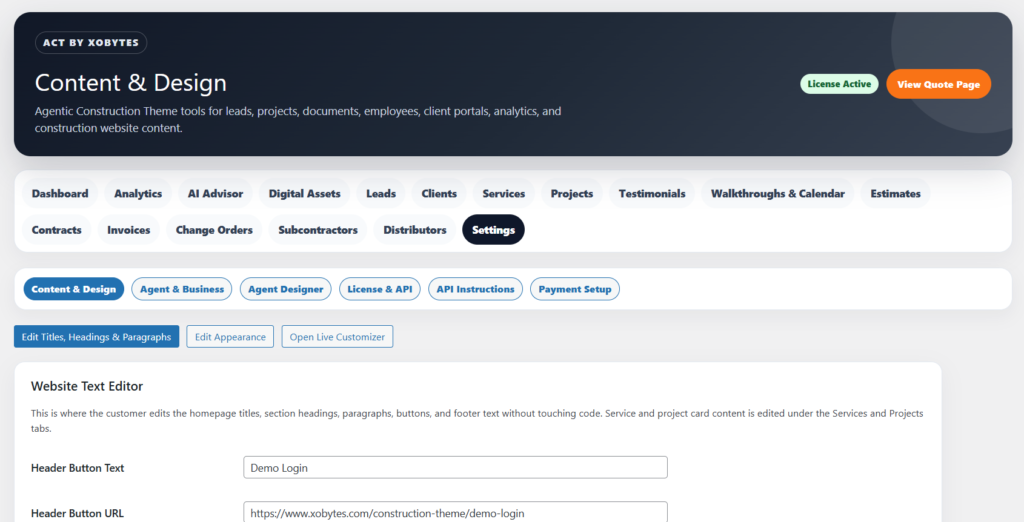
From the ACT Dashboard, a business owner can quickly access:
Leads
Services
Projects
Clients
Employees
Tasks
Analytics
AI Advisor
Digital Assets
Testimonials
Walkthroughs and calendar
Estimates
Contracts
Invoices
Change orders
Subcontractors
Distributors
Settings
Content and design controls
License and AI API status
This matters because construction businesses have many moving parts. A contractor may need to check a new lead, update a service, review a project, schedule a walkthrough, manage a client, prepare an estimate, or check employee tasks. The ACT Dashboard gives them a faster starting point.
Why the ACT Dashboard Matters for Contractors
Contractors are busy. They are often answering calls, visiting job sites, managing crews, pricing materials, talking with clients, reviewing project details, and trying to keep the next job moving.
Because of that, a contractor website should not be hard to manage.
The ACT Dashboard helps by putting the main business tools in one place. Instead of making the owner search through several disconnected menus, the dashboard shows the key numbers and links up front.
A contractor can quickly see how many leads, services, projects, clients, employees, and tasks are in the system. Then, they can open the exact area they need.
This is useful because time matters. If a new lead comes in, the business owner should be able to find it fast. If a service page needs to be updated, the owner should not have to dig through complicated settings. If the license or AI API is inactive, the dashboard can show that status clearly.
Quick Business Overview
The ACT Dashboard includes summary cards that show important business counts.
These cards can show:
Total leads
Services
Projects
Clients
Employees
Tasks
License status
This gives the business owner a quick snapshot of the system.
For example, if the dashboard shows new leads, the contractor knows there may be people waiting for a response. If the project count grows, the owner can see that the website is becoming a real project database. If employee or task counts increase, the dashboard helps the business understand that more workforce management is happening inside the system.
These numbers are simple, but they are useful. They give the owner a quick pulse check without needing to open every section one by one.
Recent Leads Table
One of the most valuable parts of the ACT Dashboard is the recent leads area.
Leads are the lifeblood of a construction business. A missed lead can become a lost project. A slow response can send the customer to another contractor. A lead with missing information can create more back-and-forth before the contractor can even decide whether the job is a good fit.
The ACT Dashboard helps by showing recent leads in a clean table.
The recent leads table can include:
Lead name
Lead status
Contact details
Project or service type
Project location
Date received
This gives the owner a faster way to review new project requests.
For example, a contractor can see who contacted the business, what kind of work they need, where the job is located, and whether the lead is new or already being handled.
That makes follow-up easier. It also helps reduce the chance of losing lead information inside emails, texts, or paper notes.
Start Editing From One Place
The dashboard includes a Start Editing area that helps the site owner quickly jump into the main editing tools.
From this area, users can open:
Content and design settings
Service management
Project management
This is important because a construction website changes over time.
A contractor may need to update homepage text, change button wording, adjust colors, add a new service, upload a recent project, update testimonials, or change website sections.
Instead of forcing the user to search through theme files or WordPress menus, the ACT Dashboard gives them direct buttons to start editing the most common parts of the site.
This makes the system easier for business owners who do not want to deal with code.
Content and Design Control
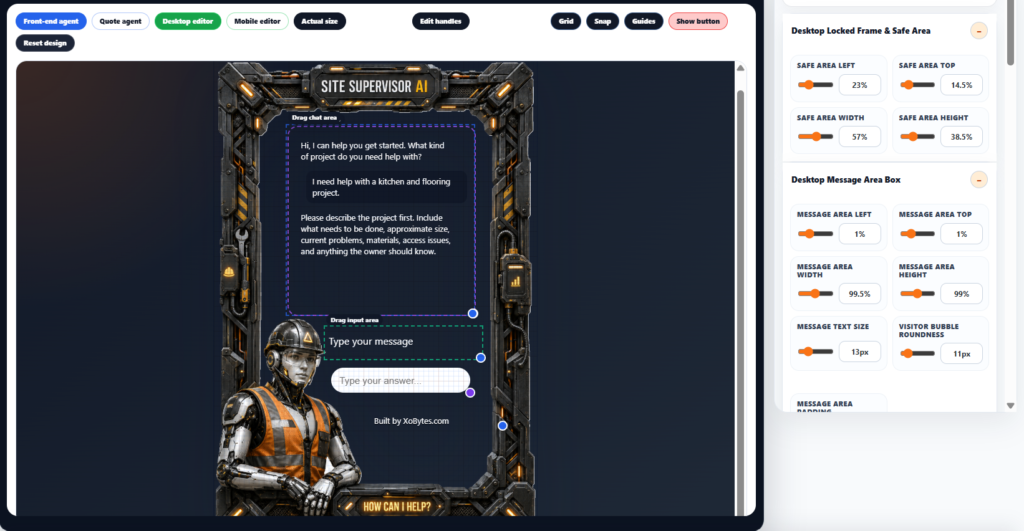
The ACT Dashboard connects to the content and design area of the Agentic Construction Theme.
This section lets the site owner control website text, colors, spacing, homepage sections, buttons, header settings, footer settings, and other visual options.
That means a contractor can customize the site without rebuilding the entire theme.
The content and design tools can help manage:
Homepage hero text
Button text
Service section content
Why choose us section
Project section text
Testimonials section
Service area section
FAQ section
Call-to-action section
Footer content
Colors
Fonts
Card style
Rounded corners
Button radius
Spacing
Header options
Footer options
This is useful because every construction business has a different brand. A high-end remodeler may want a polished luxury look. A roofing company may want a bold and direct design. A concrete company may want a strong industrial feel. The dashboard helps make those changes easier.
System Status Panel
The ACT Dashboard also includes a system status area.
This section can show important setup information, such as:
Current trade
License status
Plan information
AI API status
This helps the business owner understand whether the system is properly connected.
For example, if the license is inactive, some features may not work as expected. If the AI API is disabled, the AI-powered features may not be available. If the current trade preset is set to General Contractor, the starter service list and agent behavior may follow that trade setup.
This kind of status information is important because it prevents confusion. The owner can quickly see whether the system is ready or whether something needs to be configured.
Trade Preset Awareness
The ACT Dashboard can show the current trade preset.
This matters because the Agentic Construction Theme is not only for one type of contractor. It can be used by many trades and construction businesses.
The selected trade can help control starter services, lead questions, agent behavior, and business setup direction.
For example, the site may be configured for:
General contracting
Drywall
Painting
Remodeling
Flooring
Decks
Roofing
Siding
Concrete
Tile
Windows and doors
Plumbing
Electrical
HVAC
Handyman services
When the dashboard shows the current trade, the owner knows what type of setup the system is using.
Built for Lead Management
The ACT Dashboard is closely connected to the lead management system.
That is important because construction leads often need more than a basic contact form. A strong lead system should help collect the customer’s name, phone number, email, service need, project location, project notes, and status.
The dashboard helps the owner find these leads quickly.
From there, the business can follow up, update status, connect the lead to a project, schedule a walkthrough, or move the customer further into the business workflow.
This is much better than relying only on inbox messages.
Built for Service Management
Services are one of the most important parts of a contractor website.
Customers want to know what the company actually does. Search engines also need clear service content to understand the business.
The ACT Dashboard gives the owner quick access to manage services.
This can help the business create and organize pages or service cards for work such as:
Kitchen remodeling
Bathroom remodeling
Drywall repair
Drywall installation
Interior painting
Exterior painting
Deck building
Flooring installation
Siding
Roofing
Window installation
Door installation
Tile work
Demolition
Framing
Concrete work
When services are managed properly, the website becomes more useful for customers. It also becomes easier to grow content around each type of work.
Built for Project Management
The dashboard also gives quick access to projects.
Project management is important for contractors because completed work helps sell future jobs. A clean project section can show examples, photos, descriptions, and details from past or current work.
The ACT Dashboard helps the business owner open the project area and manage project records.
A project can be used for:
Recent work
Portfolio examples
Job tracking
Internal organization
Customer proof
Service-specific project examples
Before-and-after content
This turns the website into a living portfolio instead of a static brochure.
Connected to Clients
The ACT Dashboard includes client tracking as part of the business suite.
This gives the business a better way to separate leads from actual clients.
A lead is someone who may become a customer. A client is someone who has moved further into the process.
This distinction matters because clients may need contracts, invoices, change orders, project updates, documents, and follow-up. Leads may only need qualification, a phone call, or a walkthrough.
The dashboard makes client records part of the same system, which helps create a cleaner workflow.
Connected to Employees and Tasks
The ACT Dashboard also tracks employees and tasks.
This is helpful for contractors who need basic workforce organization inside WordPress.
Employee and task tools can support:
Employee records
Project tasks
Schedules
Time entries
Time clock workflows
Write-ups
Payments
Task status tracking
This makes the dashboard useful for more than marketing. It can also support internal business operations.
A contractor can use the dashboard to understand whether the system has active employees and task records. Then, they can open the employee or task tools when needed.
Direct Access to Major ACT Tools
The ACT Dashboard is also part of a larger admin system.
From the ACT area, users can access tools such as:
Analytics
AI Advisor
Digital Assets
Leads
Clients
Services
Projects
Testimonials
Walkthroughs and Calendar
Estimates
Contracts
Invoices
Change Orders
Subcontractors
Distributors
Settings
This makes the dashboard the front door to the entire system.
Instead of thinking of the theme as only a design, users can think of ACT as a contractor command center.
A Better Website Management Experience
Many WordPress themes require users to jump between the Customizer, page editor, plugin settings, menus, post types, and random admin pages.
That can be confusing for business owners.
The ACT Dashboard simplifies the experience by giving users one main place to begin.
From one area, the owner can review counts, check system status, open recent leads, edit content, manage services, manage projects, and move into deeper business tools.
That makes the website feel more like software and less like a pile of disconnected WordPress settings.
Helps Contractors Respond Faster
Fast response matters in construction.
If a homeowner contacts three contractors, the first one to respond professionally often has the best chance of winning the job.
The ACT Dashboard helps contractors respond faster by making recent leads easy to see.
A contractor can open the dashboard, review the new lead, check the customer’s contact information, see the requested service, and follow up.
That can help reduce missed opportunities.
Helps Keep the Website Updated
A stale contractor website can hurt trust.
If projects are old, services are outdated, or testimonials are missing, customers may wonder whether the business is active.
The ACT Dashboard gives owners direct paths to update services, projects, testimonials, and content. This encourages the site to stay fresh.
A fresh website can help show customers that the business is active, organized, and professional.
Helps Make the Theme Easier to Use
The Agentic Construction Theme includes many features. That is powerful, but it also means the system needs a clear starting point.
The ACT Dashboard solves that problem.
It gives users a simple place to begin and then organizes the rest of the software into logical areas.
For a contractor, this can make the difference between “this software is too complicated” and “I know where to go.”
Who Benefits From the ACT Dashboard?
The ACT Dashboard is useful for many types of construction and service businesses.
It is a strong fit for:
General contractors
Remodelers
Drywall contractors
Painting contractors
Roofing companies
Flooring contractors
Deck builders
Siding contractors
Concrete companies
Tile contractors
Window and door installers
Handyman services
Small construction companies
Trade businesses
Local service businesses
Any contractor who wants a smarter website and a more organized backend can benefit from the dashboard.
Why the ACT Dashboard Is Different
The ACT Dashboard is different from a normal WordPress theme dashboard because it is tied to business operations.
A basic theme dashboard may only include design options. The ACT Dashboard includes design access, lead visibility, business records, system status, and quick links to operational tools.
That makes it more valuable.
It is not just about making the website look good. It is about helping the business run better.
ACT Dashboard and the Full Agentic Construction Theme
The dashboard works as part of the complete Agentic Construction Theme by Xobytes package.
The full package includes:
The construction website theme
Agentic project assistant
Lead management
Client tools
Service cards
Project management
Testimonials
Walkthrough scheduling
PDF estimates
Estimate assemblies
Signable PDF contracts
Online payable invoices
Change orders
Subcontractor management
Distributor management
Employee management
Employee time clock
Employee payroll tools
Settings and design options
The dashboard helps connect these tools in one admin experience.
Custom Setup Available From Xobytes
Xobytes can also help configure, customize, and set up the Agentic Construction Theme for businesses that do not want to do it themselves.
The custom setup service can include help choosing a domain name, setting up hosting, configuring cPanel, setting up SSL, installing the system, customizing the theme, customizing the agent, adding 10 posts, and creating essential business pages.
The custom setup starts at:
$1,000 upfront
$100 per month thereafter
You must contact Xobytes for the custom setup service.
For setup help, contact:
971-287-0481
software@xobytes.com
Final Thoughts
The ACT Dashboard is the main control center for the Agentic Construction Theme by Xobytes.
It helps contractors manage leads, services, projects, clients, employees, tasks, license status, AI settings, website content, and business tools from one organized WordPress admin area.
For a contractor, this is a major upgrade from a basic website theme. Instead of only editing pages, the business owner can use the dashboard to monitor real activity, respond to leads, update services, manage projects, and open the tools that support the business.
If you want a construction website that does more than look good, the ACT Dashboard is one of the key reasons the Agentic Construction Theme by Xobytes is built differently.
View the product here:
Read the setup guide here: