Page
Commercial WordPress Plugin Protection With Tamper Guard
Commercial WordPress plugin protection matters when you sell software that runs inside WordPress. You worked hard to build your plugin. So, you need a way to protect your files, features, permissions, and license system from unwanted changes.
WordPress gives users a lot of freedom, and that is one reason people love it. However, that freedom can also create problems for developers who sell commercial plugins. If someone changes your plugin files, removes permission checks, edits premium features, or tries to bypass license controls, your product can lose value fast.
That is why we built Tamper Guard by Xobytes.
What Is Tamper Guard?
Tamper Guard is a commercial WordPress plugin protection tool for developers, agencies, SaaS builders, and software sellers. It helps protect already-built WordPress plugins from file changes after you prepare them for sale.
Instead of making you manually edit your plugin files, Tamper Guard uses a simple injector system. You install Tamper Guard like a normal WordPress plugin. Then, the injector adds protection to the plugin you choose.
After that, you can zip your protected plugin and sell it through your website, WooCommerce store, marketplace, or any other sales channel.
Ready to protect your plugin? Visit the Tamper Guard by Xobytes product page.
Why Commercial WordPress Plugins Need Protection
When you build a paid WordPress plugin, you may include premium features, license checks, admin tools, API access, user permissions, or paid settings. Because of that, your plugin files matter.
If someone edits those files, they may break your product, remove important checks, or change how your software works. They may also create support problems because the plugin no longer matches the clean version you released.
Tamper Guard helps solve that problem by checking protected files for changes. If a file changes, Tamper Guard can shut down the protected plugin and show a clear warning.
How Tamper Guard Works
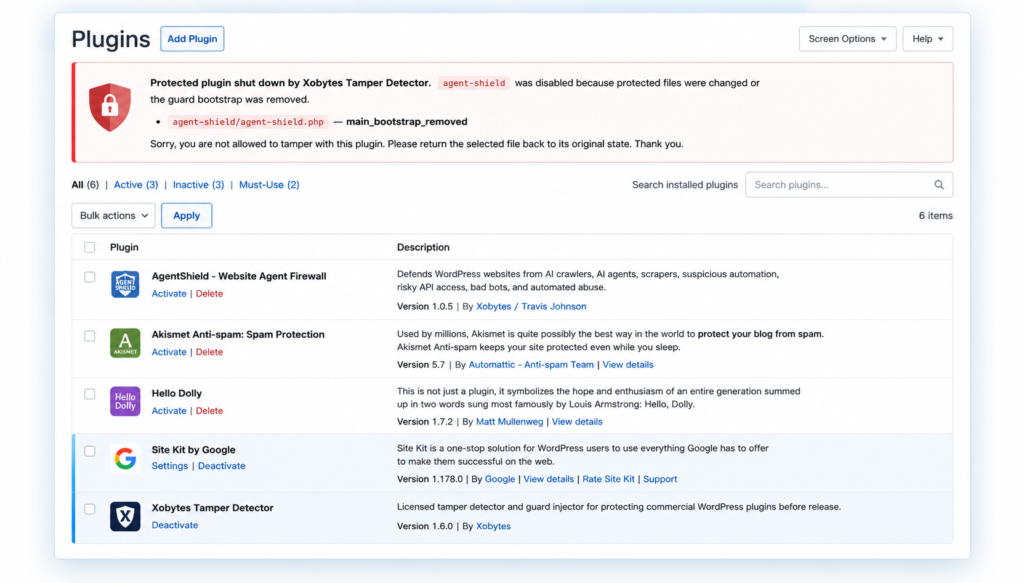
Tamper Guard starts as an injector plugin. This first plugin is called Tamper Injector. Its job is simple: it installs the protection system and injects Tamper Guard into the plugin you want to protect.
You do not need to open your code editor. Also, you do not need to paste custom code into your plugin files. Instead, you install the injector, enter your license key, and choose the plugin you want to protect from the WordPress admin area.
Step 1: Install Tamper Guard Like a Normal Plugin
First, you upload the Tamper Guard ZIP file through your WordPress dashboard. Then, you activate it like any other WordPress plugin.
After activation, Tamper Guard appears under your admin tools section. From there, you can open the Tamper Guard tool and begin the protection process.
Step 2: Choose the Plugin You Want to Protect
Next, you select the already-built plugin you want to protect. This could be a plugin you built for clients, a WooCommerce extension, a SaaS-connected tool, an AI plugin, or any commercial WordPress product you plan to sell.
Then, Tamper Guard injects its protection files into the selected plugin. It also creates a file integrity record so it can detect future changes.
Step 3: Zip and Sell Your Protected Plugin
After Tamper Guard protects your plugin, you can zip the plugin and sell it like normal. Your customer installs the plugin on their WordPress site just like they would install any other plugin.
The difference is that Tamper Guard is already inside the protected plugin. So, if someone changes a protected file, the plugin can lock itself down.
What Happens If Someone Tampers With the Plugin?
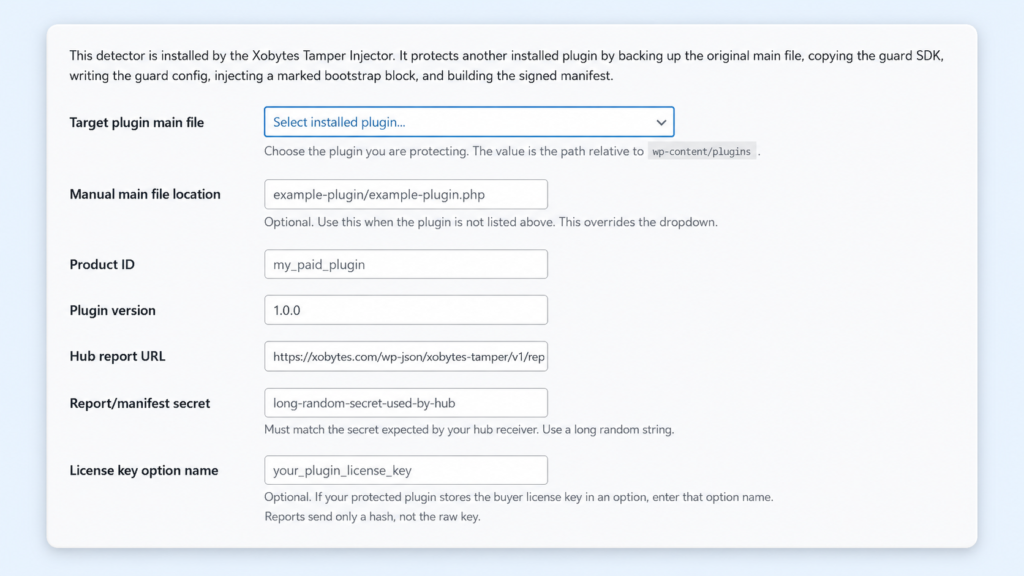
If someone edits, removes, or changes protected plugin files, Tamper Guard detects the change. Then, it can shut down the protected plugin pages and show a WordPress-style warning message.
The warning explains that the plugin locked because tampering was detected. It can also show which file changed and tell the user to return the file back to its original clean state.
This makes the problem clear. As a result, the user knows the plugin stopped working because protected files changed.
Tamper Guard Can Detect File Changes
Tamper Guard helps detect several common problems inside protected plugins. For example, it can detect edited files, missing files, removed guard files, missing manifests, and removed bootstrap protection code.
Even a small file change can trigger the protection system. Therefore, plugin sellers get a stronger way to know when their commercial product has changed after release.
No Manual Code Editing Required
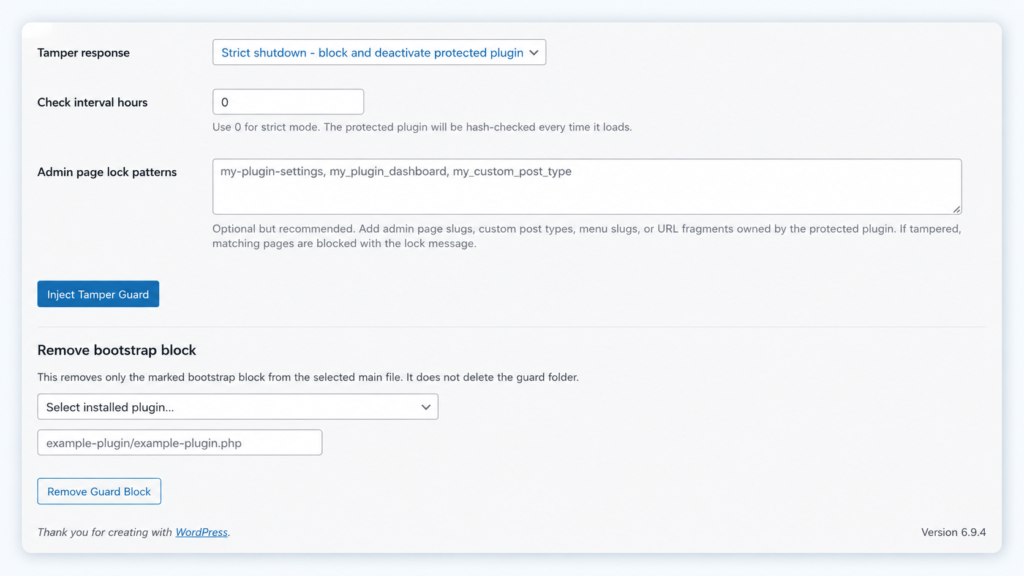
One of the best parts of Tamper Guard is that you do not have to manually edit your plugin files. The injector handles the setup for you.
This makes the tool easier for developers who want protection without rebuilding their software from scratch. It also helps teams protect plugins faster before they release them to customers.
Protect Features, Permissions, and Product Integrity
Commercial WordPress plugin protection is not only about stopping file edits. It is also about protecting the value of your software.
Your plugin may include paid features, license checks, customer permissions, API tools, admin settings, or important business logic. If someone changes those parts, your product may no longer work the way you intended.
Tamper Guard gives you a way to respond when protected files change. Instead of letting edited code keep running, the plugin can shut down and explain the problem.
Built for Developers Who Sell WordPress Plugins
Tamper Guard works well for developers who sell plugins through WooCommerce, private websites, direct client sales, software bundles, or membership platforms.
It is also useful for agencies that build custom plugins for clients. If you want the delivered plugin to stay in its original state, Tamper Guard adds another layer of protection.
Key Benefits of Tamper Guard
- Commercial WordPress plugin protection
- No manual code editing required
- Simple injector-based setup
- File integrity checking
- Tamper detection for changed files
- Shutdown screen for protected plugin pages
- Warning message that explains the issue
- Support for already-built plugins
- Useful for plugin sellers, agencies, and SaaS builders
Who Should Use Tamper Guard?
You should use Tamper Guard if you build and sell WordPress plugins. It is a strong fit for commercial plugin developers, WooCommerce extension sellers, AI software builders, SaaS plugin creators, and agencies that deliver custom WordPress software.
If your plugin includes paid features, license checks, special permissions, or important business logic, Tamper Guard can help protect your product from unwanted changes.
Final Thoughts
Tamper Guard by Xobytes was built for commercial WordPress plugin protection. It helps developers protect plugins from unwanted file changes without manually editing code.
You install the injector, choose the plugin you want to protect, and let Tamper Guard add the protection system. Then, you can zip and sell your plugin like normal.
If someone tampers with protected files, the plugin can shut down and show exactly why it locked. Because of that, Tamper Guard gives plugin sellers a stronger way to protect their work, reduce unauthorized changes, and keep their commercial software clean.
Get started today by visiting the Tamper Guard software page.