Description
WordPress AI Token System for Agentic Software
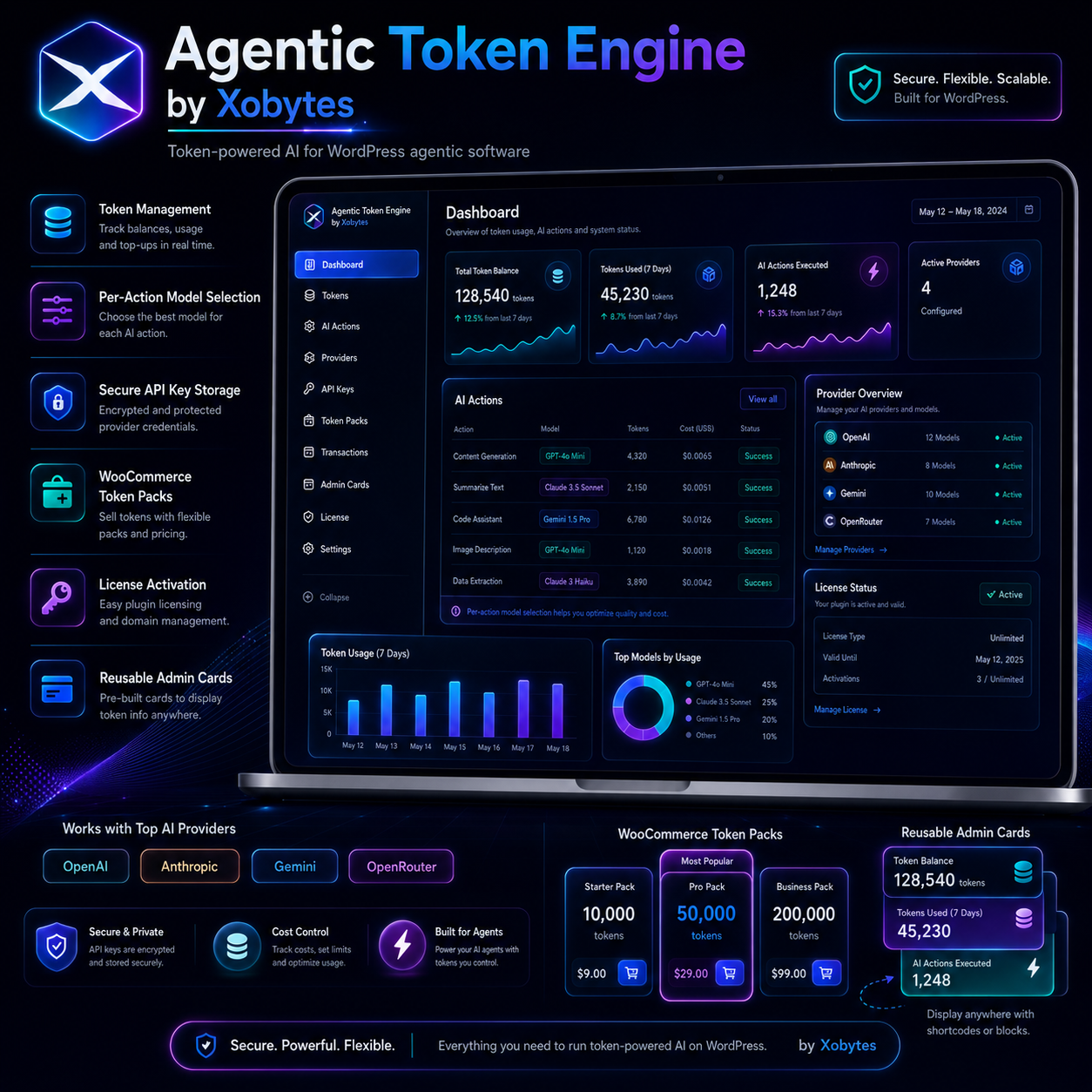
WordPress AI token system software gives your website a simple way to charge tokens for AI-powered actions. Agentic Token Engine by Xobytes helps developers, agencies, SaaS builders, and plugin sellers add token balances, AI action costs, model settings, usage limits, and WooCommerce token packs to WordPress.
If you are building agentic software, AI tools, content generators, chatbots, admin assistants, or smart WordPress plugins, you need a clean way to manage AI usage. Therefore, Agentic Token Engine gives you the foundation. You can connect AI providers, create action keys, charge tokens per action, and track everything from one dashboard.
What Is Agentic Token Engine?
Agentic Token Engine by Xobytes is a token management plugin for WordPress AI products. It lets site owners enter their own AI provider keys, create AI actions, assign token costs, choose models per action, and track user balances.
For example, you can create actions like blog post generation, SEO title creation, product description writing, chatbot replies, support answers, documentation generation, image alt text, and more. Then, each action can cost a set number of tokens.
This makes it easier to build AI-powered WordPress software without creating a token system from scratch.
Built for WordPress Plugins, Themes, and AI Tools
Agentic Token Engine works well with agentic themes, commercial plugins, SaaS-connected tools, WooCommerce products, membership sites, and custom client portals. You can use it as the token layer for almost any AI feature inside WordPress.
Instead of hardcoding token logic into every product, you can use one reusable system. As a result, your plugins and themes can share the same token balances, action settings, model choices, and usage history.
Connect Popular AI Providers
Agentic Token Engine supports multiple AI provider settings, including OpenAI, Anthropic, Google Gemini, and OpenRouter. This gives your users more flexibility when they build AI tools on their own WordPress sites.
The site owner can add their provider keys in the admin area. Then, the plugin keeps those keys server-side and uses them for AI requests. This helps prevent API keys from being exposed in page HTML, JavaScript, frontend shortcodes, or REST responses.
You can also review the official OpenAI API documentation if you want to learn more about using AI models in software projects.
Create AI Actions and Token Costs
An action key is the name your software uses when it runs an AI feature. For example, you might create an action key called generate_blog_post, write_product_description, or summarize_customer_message.
Each action can have its own token cost, provider, model, button label, and system prompt. Because of this, you can charge different amounts for different AI tasks.
Example AI Actions
- Generate blog post — 50 tokens
- Create SEO title and meta description — 15 tokens
- Write WooCommerce product copy — 35 tokens
- Generate support response — 20 tokens
- Create documentation page — 75 tokens
- Summarize customer message — 10 tokens
Choose the Best Model Per Action
Not every AI action needs the same model. Some tasks need fast, low-cost output. Other tasks need stronger reasoning or better long-form writing. Agentic Token Engine lets you choose the provider and model per action, so you can balance quality, speed, and cost.
This helps your WordPress AI tools become more flexible. Also, it gives site owners better control over how their AI budget gets used.
Manage User Token Balances
Agentic Token Engine includes user token balances and a token ledger. Admins can add tokens, remove tokens, review usage, and see which actions used tokens.
The ledger helps track token changes over time. Therefore, you can see when tokens were charged, refunded, granted, or purchased.
Daily and Monthly Usage Limits
AI usage can get expensive if you do not control it. Because of that, Agentic Token Engine includes daily and monthly usage limits. You can set limits to help control costs, reduce abuse, and protect your AI provider account.
You can also choose which WordPress user roles can access AI actions. This makes the plugin useful for membership sites, client dashboards, internal tools, and paid user systems.
Sell WooCommerce Token Packs
Agentic Token Engine can work with WooCommerce token pack products. This lets you sell token bundles directly from your WordPress store.
For example, you can sell starter packs, pro packs, business packs, or custom token bundles. After purchase, the user receives tokens that they can spend on AI actions inside your software.
Need more software for WordPress businesses? View more Xobytes software products.
Modern Token Cards for Admin Areas
Agentic Token Engine includes modern token card banners and reusable admin cards. You can place these cards inside your own plugin admin pages, theme dashboards, SaaS screens, or AI tool panels.
This makes it easy to show token balances, action costs, token usage, and AI buttons in a clean design. Also, developers can add token cards without rebuilding the interface from scratch.
Developer-Friendly Functions and Shortcodes
Developers can connect their own plugins and themes to Agentic Token Engine using helper functions, shortcodes, and reusable AI action buttons.
Example Developer Uses
- Check a user’s token balance
- Charge tokens before an AI action runs
- Refund tokens after a failed generation
- Render a token card in an admin page
- Add an AI action button to a plugin screen
- Display token balance with a shortcode
Perfect for Agentic WordPress Software
Agentic Token Engine is a strong fit for WordPress developers who want to build AI-powered products. It can support agentic themes, content generators, SEO tools, chatbots, customer support tools, product description generators, documentation builders, and custom business assistants.
Instead of creating a new billing and token system for every AI product, you can use Agentic Token Engine as the shared foundation.
Key Features
- WordPress AI token system
- OpenAI, Anthropic, Gemini, and OpenRouter provider settings
- Secure server-side API key handling
- Default AI provider and model settings
- Model selection per AI action
- Custom AI action keys
- Token cost per action
- Starting token balance
- User token balances
- Daily usage limits
- Monthly usage limits
- Allowed user role controls
- WooCommerce token pack support
- Token ledger and usage tracking
- Modern admin token cards
- Reusable AI action buttons
- Developer helper functions
- Shortcodes for balances and token cards
- Built for agentic themes, plugins, and SaaS tools
Who Should Use Agentic Token Engine?
Use Agentic Token Engine if you are building AI tools inside WordPress. It works well for plugin sellers, SaaS builders, agencies, course platforms, membership sites, AI chatbot tools, content automation tools, and agentic theme developers.
If your software needs a WordPress AI token system, this plugin gives you the core pieces: provider settings, action costs, user balances, WooCommerce packs, admin cards, and usage tracking.
Final Thoughts
Agentic Token Engine by Xobytes helps you turn WordPress into a token-powered AI platform. You can connect AI providers, create actions, set token costs, manage users, sell token packs, and add modern AI cards to your admin screens.
As a result, you can build better agentic software faster and give your users a clear way to manage AI usage.
How to use the Agentic Token Engine?
How to install the Agentic Token Engine?



