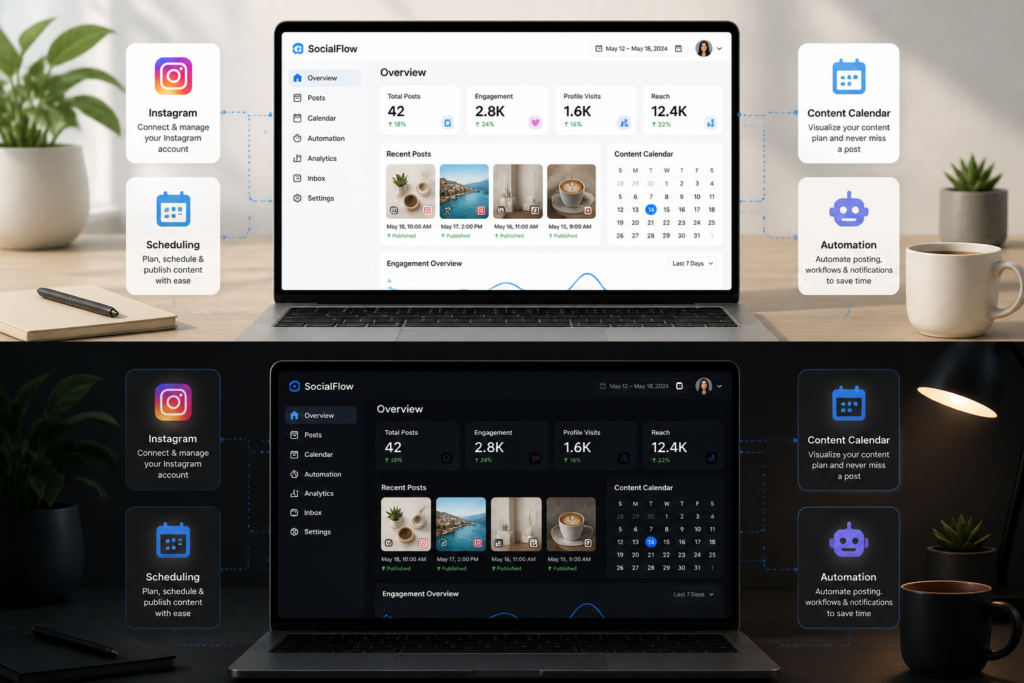
In today’s fast-paced digital landscape, automating your social media presence is crucial for success. This is especially true for Instagram, where consistent posting can significantly enhance your engagement and reach. Fortunately, you can automate Instagram posting directly from your WordPress site, thanks to powerful plugins like XoBytes Social Autopilot. This plugin allows you to schedule and promote posts, pages, and even WooCommerce products effortlessly.
By using the XoBytes Social Autopilot, you can save valuable time while maintaining an active Instagram presence. This guide will help you understand how to automate Instagram posting from WordPress using the top plugins available, including detailed comparisons and recommendations.
Why Automate Instagram Posting?
Automation can greatly enhance your social media strategy. Here are some key benefits:
- Consistency: Regular posting ensures your audience remains engaged and informed.
- Time-Saving: Automating your posts frees up time for other essential tasks.
- Enhanced Engagement: Scheduled posts can help you reach your audience at optimal times.
- WooCommerce Integration: Share your products automatically, boosting visibility and sales.
Top Plugins for Automating Instagram Posting
To make the process easier, here’s a list of the best WordPress plugins for automating Instagram posting:
- XoBytes Social Autopilot: This plugin is designed to automate your Instagram posts directly from your WordPress dashboard. It supports scheduling posts, sharing WooCommerce products, and much more.
- Instagram Feed Pro: This plugin allows you to display your Instagram feed on your WordPress site while also offering scheduling features for posts.
- Revive Old Posts: This tool automatically shares your old posts on social media, including Instagram, maximizing your content’s lifespan.
- Buffer: While not exclusively for WordPress, Buffer integrates well with WordPress and allows you to schedule posts across multiple platforms, including Instagram.
How to Set Up XoBytes Social Autopilot
Setting up the XoBytes Social Autopilot is straightforward. Here’s a quick guide:
- Install the Plugin: Download and install the XoBytes Social Autopilot from the WordPress plugin repository.
- Connect Your Instagram Account: Follow the prompts to connect your Instagram account securely.
- Schedule Your Posts: Use the intuitive interface to select posts, set your schedule, and manage your content calendar.
- Monitor Engagement: After posting, track engagement metrics to refine your strategy.
Considerations Before Choosing a Plugin
Before selecting an Instagram autoposter plugin, consider the following:
- Compatibility: Ensure the plugin works well with your current WordPress theme and other plugins.
- Ease of Use: Look for user-friendly interfaces that simplify the scheduling process.
- Cost: Evaluate if the pricing aligns with your budget and offers good value for the features provided.
Conclusion
Automating your Instagram posts from WordPress can significantly enhance your social media marketing efforts. With plugins like XoBytes Social Autopilot, you can streamline your posting process, save time, and boost engagement. Start your journey towards efficient social media management today!
Advanced Features of Instagram Autoposter Plugins
When selecting an Instagram autoposter plugin, it’s essential to consider the advanced features that can enhance your social media strategy. Here are some features to look out for:
- Hashtag Management: Some plugins offer built-in hashtag suggestions or allow you to save hashtag sets for easy access, helping you reach a broader audience.
- Analytics and Reporting: Look for plugins that provide detailed analytics on post performance, including engagement rates, follower growth, and click-through rates.
- Customizable Posting Schedules: The ability to customize posting times based on your audience’s activity can significantly improve engagement.
- Multi-Account Support: If you manage multiple Instagram accounts, choose a plugin that allows you to switch between accounts seamlessly.
Related XoBytes Products

Social Media Autopilot With AI by XoBytes.com
$19.99
Xobytes Social Autopilot is a WordPress social media autoposter that helps schedule and promote posts, pages, WooCommerce products,…

AI SEO Data & Automatic Blog Writer for WordPress by XoBytes
$19.99
Turn your WordPress site, Google Search Console data, and SEO opportunities into smarter blog posts, pages, titles, meta…

Agentic Support Desk for WordPress by XoBytes.com
$19.99
Agentic Support Desk by Xobytes is an AI-powered WordPress support desk built for software sellers, WooCommerce stores, agencies,…

Upgrades, Packages & Tiers for WooCommerce By XoBytes.com
$25.00
This is a FREEMIUM plugin. Get the free version "Upgrades, Packages & Tiers for WooCommerce By XoBytes.com" Pro…

Agentic Consultant, Product Rep, & Customer Service Agent By XoBytes.com
$19.99
Agentic Consultant for WordPress gives your website a smart AI product rep, customer service agent, and hands-free voice…
Plugin Update Server for WordPress by XoBytes.com
$25.00
Plugin Update Server by XoBytes lets WordPress plugin sellers deliver private plugin updates directly to customer dashboards. Upload…
Product 1 of 6
How to Choose the Right Instagram Autoposter Plugin
Choosing the right plugin for automating Instagram posting from WordPress can be overwhelming due to the number of options available. Here’s a structured approach to help you make an informed decision:
Continue with How to Automate Instagram Posts from WordPress with XoBytes Instagram Autoposter for additional XoBytes guidance.
- Define Your Goals: Determine what you want to achieve with your Instagram automation. Is it increased engagement, more followers, or driving traffic to your website?
- Research and Compare: Make a list of potential plugins and compare their features, pricing, and user reviews. Consider using comparison websites or forums to gather insights.
- Test the Free Versions: Many plugins offer free trials or basic versions. Test these to see which interface you prefer and how well they meet your needs.
- Check Support and Updates: Ensure that the plugin is regularly updated and has responsive customer support. This is crucial for resolving any issues that may arise.
Practical Examples of Successful Automation
To illustrate the effectiveness of automating Instagram posting from WordPress, here are a few practical examples of businesses that have successfully implemented this strategy:
- Online Retailer: An e-commerce store used XoBytes Social Autopilot to schedule daily posts showcasing new products. As a result, they saw a 30% increase in online sales within three months.
- Travel Blogger: A travel blogger utilized Instagram Feed Pro to display their Instagram feed on their website, while also scheduling posts to share travel tips. This led to a 50% increase in website traffic and engagement on Instagram.
- Fitness Coach: A fitness coach used Revive Old Posts to share previous workout tips and success stories. This automation kept their audience engaged and contributed to a 25% increase in client inquiries.
Implementation Steps for Automating Instagram Posting
Once you have chosen the right plugin, follow these steps to implement Instagram automation effectively:
- Install the Plugin: Go to your WordPress dashboard, navigate to the plugins section, and install your chosen Instagram autoposter plugin.
- Connect Your Instagram Account: Follow the setup wizard to link your Instagram account. Ensure you grant the necessary permissions for posting.
- Create a Content Calendar: Plan your content in advance. Use a spreadsheet or the plugin’s built-in calendar feature to map out your posts.
- Schedule Posts: Use the plugin’s scheduling feature to set specific times for your posts. Consider your audience’s time zone for optimal engagement.
- Monitor and Adjust: After your posts go live, monitor their performance. Use the analytics provided by the plugin to adjust your strategy as needed.
Common Mistakes to Avoid
While automating Instagram posting can save time and enhance engagement, there are common pitfalls to avoid:
- Over-Automation: Relying too heavily on automation can lead to a lack of authenticity. Balance automated posts with real-time engagement.
- Ignoring Analytics: Failing to review performance metrics can hinder your ability to refine your strategy. Regularly check analytics to understand what works.
- Neglecting Content Quality: Automation should not compromise the quality of your content. Ensure that all scheduled posts are visually appealing and relevant to your audience.
Frequently Asked Questions
Here are some common questions about automating Instagram posting from WordPress:
- What is a WordPress Instagram autoposter plugin?
- How does XoBytes Instagram Autoposter improve social media marketing?
- Is it easy to set up Instagram autoposter plugins on WordPress?
- Can I use Instagram autoposter plugins with WooCommerce products?
A WordPress Instagram autoposter plugin automates the process of scheduling and publishing posts directly to your Instagram account from your WordPress site, saving time and maintaining consistent social media activity.
XoBytes Instagram Autoposter allows you to schedule posts, including WooCommerce products, in advance, increasing engagement, saving time, and ensuring a steady flow of content without manual posting.
Yes, most top plugins like XoBytes Instagram Autoposter are designed for user-friendly setup, with step-by-step guides and support to help you connect your Instagram account and schedule posts easily.
Absolutely, plugins like XoBytes Social Autopilot integrate with WooCommerce, enabling automatic sharing of your products on Instagram to boost sales and visibility.
Leave a Reply