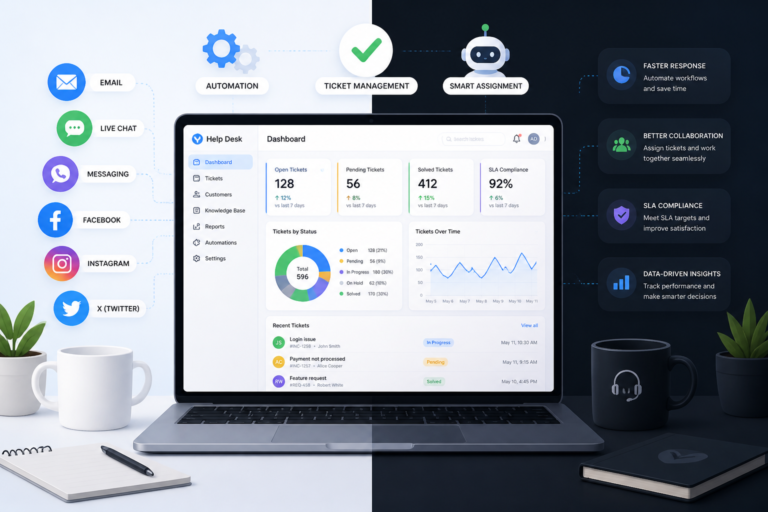
In today’s fast-paced digital landscape, providing exceptional customer support is crucial for any business. Therefore, selecting the right help desk ticket plugin for your WordPress site can significantly enhance your customer service experience. This article will guide you through expert tips for picking the right help desk ticket plugin for your WordPress site.
Understanding Help Desk Ticket Plugins
Help desk ticket plugins are essential tools that streamline customer support processes. They allow you to manage customer inquiries, track support requests, and improve response times. However, with numerous options available, how do you choose the best one for your needs?
Key Features to Look For
When selecting a help desk ticket plugin, consider the following key features:
- Support Automation: Automate repetitive tasks to save time and improve efficiency.
- Multi-Channel Communication: Ensure the plugin supports various communication channels like email, chat, and social media.
- Ticket Management: Look for features that allow easy tracking and categorization of tickets.
- Knowledge Base Integration: A built-in knowledge base can help customers find answers independently.
- Customization Options: The ability to customize the plugin to fit your branding and workflow is crucial.
For a detailed exploration of these features, check out our article on Top Features to Look for in WordPress Help Desk Ticket Plugins.
Benefits of Using a Help Desk Ticket Plugin
Using a help desk ticket plugin offers numerous benefits:
- Improved Response Times: Automating responses can significantly reduce the time it takes to address customer inquiries.
- Enhanced Customer Satisfaction: Quick and effective support leads to happier customers.
- Better Tracking and Reporting: Monitor support performance through analytics and reporting tools.
How to Choose the Right Plugin
Choosing the right help desk plugin involves several steps:
- Assess Your Needs: Determine what features are essential for your business.
- Research Options: Look for plugins that meet your criteria and read user reviews.
- Test Before You Commit: Many plugins offer free trials; take advantage of these to test functionality.
- Consider Integration: Ensure the plugin integrates smoothly with your existing tools and platforms.
By following these steps, you can make an informed decision that meets your customer service needs.
Recommended Help Desk Plugins for WordPress
While there are many plugins available, here are a few highly recommended options:
- Agentic Support Desk: An AI-powered support desk designed for efficiency.
- Zendesk for WordPress: A popular choice that integrates well with WordPress.
- Freshdesk: Offers robust features for ticket management and customer support.
For a complete list of plugins, visit our article on Best Help Desk Plugins for WordPress.
Setting Up Your Help Desk Plugin
Once you’ve selected a plugin, follow these steps to set it up:
- Install the Plugin: Download and install the plugin through your WordPress dashboard.
- Configure Settings: Adjust the settings to match your business needs.
- Customize Appearance: Make sure the plugin aligns with your branding.
- Train Your Team: Educate your support team on how to use the new system effectively.
Proper setup ensures that your help desk operates smoothly and efficiently.
Understanding Your Customer Support Needs
Before diving into plugin options, it’s essential to have a clear understanding of your customer support needs. Consider the following:
- Volume of Inquiries: Assess how many support requests you typically receive daily or weekly.
- Types of Support: Identify whether you require email support, live chat, or social media integration.
- Team Size: Consider how many team members will be using the help desk plugin and their specific roles.
Comparing Help Desk Plugins
When evaluating different help desk ticket plugins, use the following criteria to make an informed comparison:
For a practical companion to this section, explore How to Choose the Best Help Desk Ticket Plugin for WordPress in 2026.
- Pricing Structure: Compare the pricing models of each plugin. Some may offer a one-time purchase, while others have a subscription model.
- Scalability: Ensure the plugin can grow with your business. Look for features that can accommodate increasing ticket volumes.
- User Interface: A user-friendly interface can greatly enhance the experience for both your support team and customers.
Implementation Steps for Your Help Desk Plugin
Once you have selected a help desk ticket plugin, follow these detailed implementation steps to ensure a smooth transition:
- Backup Your Site: Before making any changes, back up your WordPress site to prevent data loss.
- Install and Activate the Plugin: Navigate to your WordPress dashboard, go to Plugins, and click on Add New. Upload your chosen plugin and activate it.
- Configure Essential Settings: Set up ticket priorities, notifications, and response templates to streamline your workflow.
- Integrate with Other Tools: Connect the help desk plugin with your CRM, email marketing tools, and other relevant platforms.
- Test Functionality: Conduct thorough testing to ensure all features are working as expected. Simulate customer inquiries to see how the system handles them.
- Gather Feedback: After implementation, solicit feedback from your support team and customers to identify areas for improvement.
Best Practices for Using Help Desk Plugins
To maximize the effectiveness of your help desk plugin, consider these best practices:
- Regularly Update the Plugin: Keep your help desk plugin updated to benefit from new features and security enhancements.
- Monitor Performance: Use the analytics tools provided by the plugin to track response times, ticket resolution rates, and customer satisfaction levels.
- Encourage Self-Service: Promote the use of your knowledge base to empower customers to find answers independently, reducing the volume of tickets.
Related XoBytes Products

Agentic Support Desk for WordPress by XoBytes.com
$19.99
Agentic Support Desk by Xobytes is an AI-powered WordPress support desk built for software sellers, WooCommerce stores, agencies,…

Tamper Guard by XoBytes | WordPress Plugin Tamper Detector
$25.00
Protect your commercial WordPress plugins with license-based tamper detection, file integrity monitoring, automatic shutdown protection, and site reporting.…

AI SEO Data & Automatic Blog Writer for WordPress by XoBytes
$19.99
Turn your WordPress site, Google Search Console data, and SEO opportunities into smarter blog posts, pages, titles, meta…

Plugin Update Server for WordPress by XoBytes.com
$25.00
Plugin Update Server by XoBytes lets WordPress plugin sellers deliver private plugin updates directly to customer dashboards. Upload…

Agentic Consultant, Product Rep, & Customer Service Agent By XoBytes.com
$19.99
Agentic Consultant for WordPress gives your website a smart AI product rep, customer service agent, and hands-free voice…

Agentic Construction Theme | More than just a theme | Built for all trades
$49.99
Why You Need This Theme And Plugin! Click here for the Demo Agentic Construction Theme by XoBytes is…
Product 1 of 6
Case Study: Successful Implementation of a Help Desk Plugin
Consider a medium-sized e-commerce business that implemented a help desk ticket plugin to streamline their customer service. Before the implementation, they struggled with high response times and customer dissatisfaction. After evaluating their needs, they selected a plugin that offered:
- Multi-channel support including email and live chat.
- Automation features that routed tickets based on urgency.
- A comprehensive knowledge base for self-service.
After implementation, the business reported:
- A 50% reduction in average response time.
- A 30% increase in customer satisfaction ratings.
- Improved team efficiency with the automation of repetitive tasks.
This case illustrates the importance of selecting the right help desk plugin tailored to specific business needs.
Evaluating Customer Support Metrics
Once your help desk plugin is up and running, it’s vital to track and evaluate your customer support metrics. This will help you understand how well the plugin is performing and where improvements can be made. Key metrics to monitor include:
- Response Time: The average time it takes for your team to respond to a ticket.
- Resolution Time: The total time taken to resolve a ticket from the moment it was created.
- Customer Satisfaction Score (CSAT): A measure of how satisfied customers are with the support they received.
- Ticket Volume: The number of tickets received over a specific period.
- First Contact Resolution Rate: The percentage of tickets resolved on the first interaction.
By regularly reviewing these metrics, you can identify trends, address potential issues, and continually improve your customer support processes.
Integrating with Other Tools
To maximize the effectiveness of your help desk plugin, consider integrating it with other tools your business uses. This can enhance workflow efficiency and provide a seamless experience for both your support team and customers. Common integrations include:
Continue with How to Choose the Right Helpdesk Ticket Plugin for Your WordPress Support System for additional XoBytes guidance.
- CRM Systems: Link your help desk plugin with your customer relationship management system to maintain a unified view of customer interactions.
- Email Marketing Tools: Integrate with email platforms to automate follow-up communications and newsletters.
- Chatbots: Use chatbots to handle basic inquiries, allowing your support team to focus on more complex issues.
- Project Management Tools: Connect with project management software to track support-related tasks and projects.
These integrations can streamline processes and ensure that your support team has all the necessary information at their fingertips.
Real-World Examples of Help Desk Plugin Use
To illustrate the impact of choosing the right help desk plugin, consider the following real-world examples:
- A SaaS Company: After implementing a help desk plugin, they saw a 60% decrease in ticket resolution time. The automation features allowed them to prioritize urgent tickets and route them to the appropriate team members.
- An Online Retailer: By integrating their help desk plugin with their CRM, they could access customer purchase histories while handling support requests, leading to more personalized service and a 40% increase in customer satisfaction.
- A Non-Profit Organization: They utilized a help desk plugin to manage volunteer inquiries and support requests. By creating a knowledge base, they empowered volunteers to find answers independently, reducing ticket volume by 25%.
These examples demonstrate how the right help desk plugin can transform customer support operations across various industries.
Future-Proofing Your Help Desk Solution
When selecting a help desk ticket plugin, it’s essential to consider its longevity and adaptability. Here are some strategies to future-proof your help desk solution:
- Regular Updates: Choose a plugin that receives regular updates and improvements from its developers to ensure it stays current with industry standards.
- Scalability: Opt for a plugin that can grow with your business, accommodating increased ticket volumes and additional features as needed.
- User Community: Look for plugins with an active user community or support forum, which can provide valuable insights and shared experiences.
- Feedback Mechanism: Implement a system for collecting feedback from your team and customers on the help desk experience, allowing you to make informed adjustments over time.
By considering these factors, you can ensure that your help desk solution remains effective and relevant for years to come.
Frequently Asked Questions
Here are some common questions regarding help desk ticket plugins:
- What features should I look for in a WordPress help desk ticket plugin?
Key features include support automation, multi-channel communication, ticket management, knowledge base integration, and easy customization. - How can I improve customer support efficiency with a WordPress ticket plugin?
By selecting a plugin with automation, streamlined workflows, and multi-channel support, you can reduce response times and enhance customer satisfaction. - Are there any recommended help desk plugins for WordPress in 2026?
Yes, plugins like Agentic Support Desk and others highlighted in related articles offer robust features tailored for WordPress support needs.
In conclusion, selecting the right help desk ticket plugin for your WordPress site can greatly enhance your customer support operations. By considering the key features and following the tips outlined in this article, you can make an informed decision that benefits both your business and your customers.