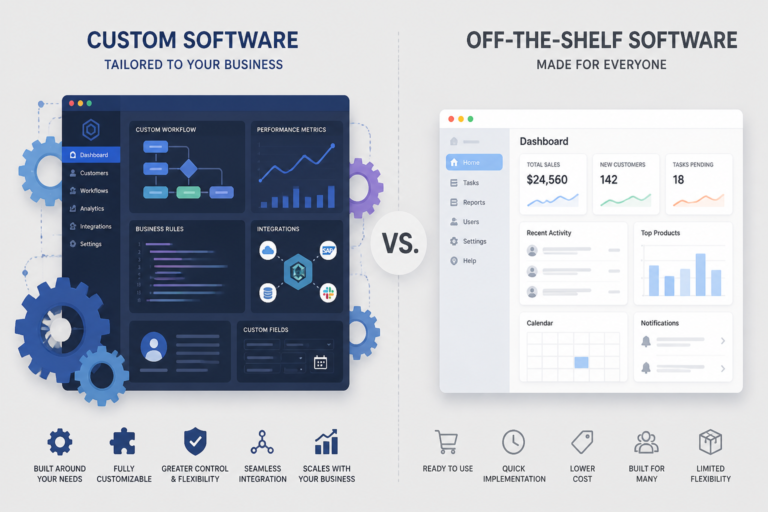
In the competitive landscape of modern business, choosing the right software solution is crucial. Companies often find themselves debating between proprietary and off-the-shelf software. Each option presents unique advantages and challenges, making it essential to understand their differences. In this article, we will explore the key aspects of proprietary versus off-the-shelf software to help you decide which solution fits your business best.
Understanding Proprietary Software
Proprietary software refers to applications that are custom-developed by a specific company or individual. This type of software is designed to meet the unique needs of the organization, offering tailored features and functionalities. Because of this, proprietary software can provide a significant competitive advantage.
- Customization: Proprietary software can be tailored to fit specific business processes and workflows, ensuring that it meets all operational requirements.
- Control: Organizations have complete control over the software, including updates, security, and maintenance.
- Integration: Custom software can be seamlessly integrated with existing systems, enhancing overall efficiency.
Exploring Off-the-Shelf Software
In contrast, off-the-shelf software refers to ready-made applications that are designed for general use. These solutions are widely available and often cater to a broad audience. While off-the-shelf software can be a cost-effective option, it may not fully address the specific needs of every business.
For useful background on this topic, see Custom Build Software vs Off-the-Shelf: Which Solution Fits Your Business Best?.
- Cost-Effectiveness: Off-the-shelf software usually has lower upfront costs, making it accessible for small to medium-sized businesses.
- Quick Deployment: These solutions can be implemented quickly, allowing businesses to start using them almost immediately.
- Standard Features: Off-the-shelf software includes standard features that can be beneficial for many organizations, but customization options may be limited.
Key Differences Between Proprietary and Off-the-Shelf Software
To make an informed decision, it’s important to understand the key differences between proprietary and off-the-shelf software. Here are some factors to consider:
- Customization: Proprietary software offers extensive customization, while off-the-shelf solutions provide limited options.
- Cost: Off-the-shelf software generally incurs lower initial costs, but proprietary software can reduce long-term expenses if tailored effectively.
- Control: Organizations have complete control over proprietary software, while off-the-shelf software is governed by the vendor’s terms.
- Support and Maintenance: Proprietary software often comes with dedicated support, whereas off-the-shelf solutions may rely on community forums or general support.
When to Choose Proprietary Software
Choosing proprietary software may be the best option for your business if:
- You have unique business processes that require specialized functionality.
- Your organization needs complete control over software updates and maintenance.
- You want to gain a competitive edge through tailored solutions.
When to Choose Off-the-Shelf Software
On the other hand, off-the-shelf software may be more suitable if:
- Your business needs a quick and cost-effective solution.
- You require standard features that are widely applicable across industries.
- Your organization has limited resources for software development and maintenance.
Evaluating Costs
Cost is often a significant factor in the decision-making process. While off-the-shelf software typically has lower upfront costs, it can incur ongoing licensing or subscription fees. In contrast, proprietary software may require a higher initial investment but can lead to reduced long-term costs if it effectively meets your business needs.
For a practical companion to this section, explore How Custom Made Software Differs from Off-the-Shelf Solutions: Key Comparisons and Business Benefits.
Integration and Compatibility
Another crucial aspect to consider is integration. Proprietary software can be designed to work seamlessly with your existing systems, enhancing overall efficiency. Off-the-shelf software, while generally compatible with common platforms, may not integrate as smoothly with specialized systems.
Real-World Examples
To illustrate the differences, let’s consider a few examples:
- Proprietary Software: A healthcare organization might develop a custom electronic health record (EHR) system tailored to its specific workflows and regulatory requirements.
- Off-the-Shelf Software: A small business could use a widely available accounting software solution that meets basic financial management needs.
Conclusion
In conclusion, the choice between proprietary and off-the-shelf software depends on your business’s unique needs and goals. Proprietary software offers customization and control, while off-the-shelf solutions provide cost-effectiveness and quick deployment. By carefully evaluating your requirements, you can make an informed decision that will support your business’s growth and efficiency.
Related XoBytes Products

Agentic Consultant, Product Rep, & Customer Service Agent By XoBytes.com
$19.99
Agentic Consultant for WordPress gives your website a smart AI product rep, customer service agent, and hands-free voice…

Tamper Guard by XoBytes | WordPress Plugin Tamper Detector
$25.00
Protect your commercial WordPress plugins with license-based tamper detection, file integrity monitoring, automatic shutdown protection, and site reporting.…

Agentic Support Desk for WordPress by XoBytes.com
$19.99
Agentic Support Desk by Xobytes is an AI-powered WordPress support desk built for software sellers, WooCommerce stores, agencies,…

Social Media Autopilot With AI by XoBytes.com
$19.99
Xobytes Social Autopilot is a WordPress social media autoposter that helps schedule and promote posts, pages, WooCommerce products,…

Agent Shield by XoBytes | Protect against agentic software
$25.00
AgentShield is a WordPress AI Agent Firewall that helps detect, monitor, block, and temporarily ban AI crawlers, AI…

Agentic Construction Theme | More than just a theme | Built for all trades
$49.99
Why You Need This Theme And Plugin! Click here for the Demo Agentic Construction Theme by XoBytes is…
Product 1 of 6
Implementation Steps for Proprietary Software
Implementing proprietary software can be a complex process, but following a structured approach can help ensure success. Here are the key steps to consider:
Continue with Understanding Off-the-Shelf Software: Key Benefits and Use Cases for additional XoBytes guidance.
- Needs Assessment: Begin by conducting a thorough analysis of your business requirements. Identify specific pain points and desired functionalities that the software should address.
- Vendor Selection: Choose a reputable vendor with experience in developing proprietary software. Request proposals and assess their capabilities based on your needs.
- Development Process: Collaborate closely with the development team to ensure that the software aligns with your specifications. Regular feedback during the development phase is crucial.
- Testing: Before full deployment, conduct rigorous testing to identify and resolve any issues. This may include user acceptance testing (UAT) to ensure that end-users are satisfied with the functionality.
- Training: Provide comprehensive training for your staff to ensure they are comfortable using the new software. This can include hands-on sessions, tutorials, and documentation.
- Launch: Roll out the software in phases, if possible, to minimize disruption. Monitor its performance and gather user feedback for continuous improvement.
Integration Strategies for Off-the-Shelf Software
While off-the-shelf software can be quicker to implement, ensuring it integrates well with your existing systems is vital for maximizing its effectiveness. Here are strategies for successful integration:
- API Utilization: Check if the off-the-shelf software provides APIs (Application Programming Interfaces) for integration. APIs can facilitate data exchange between different systems.
- Middleware Solutions: Consider using middleware to bridge gaps between the off-the-shelf software and your existing applications. Middleware can help in data synchronization and process automation.
- Customization Options: Some off-the-shelf solutions offer customization features. Explore these options to tailor the software to better fit your business processes.
- Data Migration: Plan for data migration carefully. Ensure that data from your previous systems is accurately transferred to the new software without loss or corruption.
Comparative Analysis: Long-Term Value of Proprietary vs Off-the-Shelf Software
When evaluating the long-term value of proprietary versus off-the-shelf software, consider the following factors:
- Scalability: Proprietary software can be designed to scale with your business, accommodating growth and changing needs over time. Off-the-shelf solutions may require additional licenses or upgrades as your business expands.
- Support and Updates: Proprietary software typically includes dedicated support and regular updates tailored to your organization’s requirements. In contrast, off-the-shelf software may have generic updates that do not address specific business needs.
- Competitive Advantage: Custom solutions can provide unique features that set your business apart from competitors, whereas off-the-shelf software may be widely used, leading to a lack of differentiation.
Case Studies: Successful Implementations
Examining real-world case studies can provide valuable insights into the decision-making process for choosing between proprietary and off-the-shelf software:
- Case Study 1: A large retail chain opted for proprietary software to create a custom inventory management system. This system integrated seamlessly with their existing POS systems and allowed for real-time inventory tracking, significantly reducing stock discrepancies.
- Case Study 2: A startup in the tech industry chose off-the-shelf project management software for its initial phase. This allowed them to quickly establish workflows and manage tasks effectively without the burden of development costs. As the company grew, they later transitioned to a proprietary solution that better fit their evolving needs.
Frequently Asked Questions
Here are some common questions about proprietary and off-the-shelf software:
- What are the main differences between proprietary and off-the-shelf software? Proprietary software is custom-developed or owned by a company, offering tailored features and control, while off-the-shelf software is ready-made, standardized, and designed for general use.
- When should a business choose custom proprietary software over off-the-shelf solutions? A business should consider custom proprietary software when unique workflows, specialized features, or competitive advantages are needed that cannot be met by standard solutions.
- What are the typical cost differences between proprietary and off-the-shelf software? Off-the-shelf software generally has lower upfront costs but may incur licensing or subscription fees, whereas proprietary solutions often require higher initial investment but can reduce ongoing licensing costs if tailored effectively.
- Can off-the-shelf software be customized to fit business needs? Yes, many off-the-shelf solutions offer customization options, integrations, or add-ons, but they may not fully match the specific requirements that custom software can provide.
For more insights on software solutions, check out our article on Custom Build Software vs Off-the-Shelf.