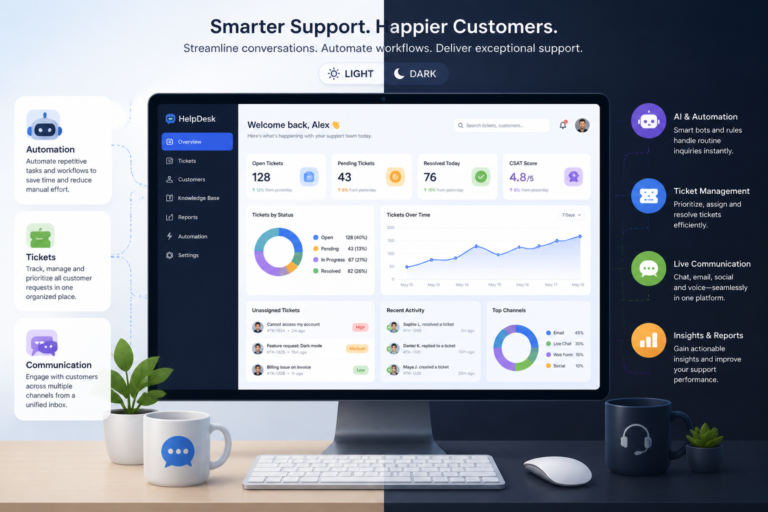
In today’s fast-paced digital landscape, providing exceptional customer support is crucial for any business. Therefore, selecting the right help desk ticket plugin for your WordPress site can significantly enhance your customer service experience. In this article, we will share expert tips for picking the right help desk ticket plugin, focusing on crucial features, integration capabilities, and real-world plugin options.
Why You Need a Help Desk Ticket Plugin
First, a help desk ticket plugin streamlines customer inquiries and support requests. By organizing tickets, you can track issues more efficiently and ensure timely responses. Moreover, these plugins often come with automation features that reduce manual work, allowing your team to focus on resolving customer issues rather than managing queries.
Key Features to Look For
When evaluating help desk ticket plugins, consider the following key features:
- Support Automation: Look for plugins that offer automation capabilities, such as auto-assigning tickets and sending automated responses.
- Multi-Channel Communication: A good plugin should support multiple channels, including email, chat, and social media, to ensure customers can reach you through their preferred method.
- Ticket Management: Effective ticket management features allow you to categorize, prioritize, and track tickets easily.
- Knowledge Base Integration: This feature helps customers find answers independently, reducing the volume of incoming tickets.
- Customization Options: The ability to customize the plugin according to your branding and workflow needs is essential.
Top Help Desk Ticket Plugins for WordPress
To make this easier, here are some popular help desk ticket plugins you might consider:
- Agentic Support Desk: This AI-powered plugin offers robust features tailored for WordPress support needs. For more information, check out Agentic Support Desk.
- WP Support Plus: Known for its user-friendly interface, this plugin provides excellent ticket management features and integrates well with other tools.
- Zendesk for WordPress: If you are already using Zendesk, this integration allows you to manage support tickets directly from your WordPress dashboard.
- Freshdesk: This plugin offers a comprehensive customer support solution with features like ticket management, reporting, and analytics.
In addition, you can explore more options in our article on best help desk ticket plugins for WordPress.
Comparing Help Desk Ticket Plugins
When comparing different help desk ticket plugins, consider the following factors:
For a practical companion to this section, explore Expert Tips for Picking the Right Help Desk Ticket Plugin for Your WordPress Site.
- Pricing: Evaluate whether the pricing fits your budget and if the plugin offers a free trial.
- Ease of Use: Ensure that the plugin is user-friendly and does not require extensive training for your team.
- Customer Support: Check the level of customer support provided by the plugin developers, as this can be crucial when you face issues.
- Integration Capabilities: Look for plugins that easily integrate with your existing tools, such as CRM systems or email marketing platforms.
Best Practices for Using Help Desk Plugins
To maximize the benefits of your help desk ticket plugin, follow these best practices:
- Train Your Team: Provide proper training to your support staff to ensure they can use the plugin effectively.
- Set Clear Guidelines: Establish clear guidelines for ticket handling to maintain consistency in customer support.
- Regularly Update: Keep your plugin updated to ensure you benefit from the latest features and security patches.
Implementation Steps for Your Help Desk Ticket Plugin
Once you’ve selected the right help desk ticket plugin for your WordPress site, the next step is to implement it effectively. Here’s a step-by-step guide to ensure a smooth setup and integration:
- Backup Your Website: Before making any changes, ensure that you back up your WordPress site. This will protect your data in case anything goes wrong during the installation process.
- Install the Plugin: Navigate to the Plugins section in your WordPress dashboard. Click on Add New, search for your chosen help desk plugin, and click Install Now. After installation, click Activate.
- Configure Settings: Access the plugin’s settings from your dashboard. Customize the general settings, including email notifications, ticket categories, and response templates.
- Integrate with Other Tools: If your help desk plugin supports integrations, connect it with your CRM, email marketing tools, or any other applications you use to streamline your workflow.
- Customize the User Interface: Modify the appearance of the help desk to match your website’s branding. This includes colors, logos, and layout adjustments.
- Test the System: Before going live, conduct thorough testing. Submit test tickets, check notifications, and ensure that all features work as intended.
- Train Your Team: Organize training sessions for your support staff to familiarize them with the new system. Provide them with resources and documentation to refer to as needed.
Related XoBytes Products

Agentic Support Desk for WordPress by XoBytes.com
$19.99
Agentic Support Desk by Xobytes is an AI-powered WordPress support desk built for software sellers, WooCommerce stores, agencies,…

Tamper Guard by XoBytes | WordPress Plugin Tamper Detector
$25.00
Protect your commercial WordPress plugins with license-based tamper detection, file integrity monitoring, automatic shutdown protection, and site reporting.…

AI SEO Data & Automatic Blog Writer for WordPress by XoBytes
$19.99
Turn your WordPress site, Google Search Console data, and SEO opportunities into smarter blog posts, pages, titles, meta…

Plugin Update Server for WordPress by XoBytes.com
$25.00
Plugin Update Server by XoBytes lets WordPress plugin sellers deliver private plugin updates directly to customer dashboards. Upload…

Agentic Consultant, Product Rep, & Customer Service Agent By XoBytes.com
$19.99
Agentic Consultant for WordPress gives your website a smart AI product rep, customer service agent, and hands-free voice…

Agentic Construction Theme | More than just a theme | Built for all trades
$49.99
Why You Need This Theme And Plugin! Click here for the Demo Agentic Construction Theme by XoBytes is…
Product 1 of 6
Comparative Analysis of Popular Help Desk Plugins
To help you further in your decision-making process, here’s a comparative analysis of some of the most popular help desk plugins:
Continue with How to Choose the Best Help Desk Ticket Plugin for WordPress in 2026 for additional XoBytes guidance.
| Plugin | Key Features | Pricing | User Rating |
|---|---|---|---|
| Agentic Support Desk | AI-driven responses, multi-channel support, customizable workflows | Starts at $15/month | 4.8/5 |
| WP Support Plus | User-friendly interface, ticket management, reporting tools | Free with premium add-ons | 4.5/5 |
| Zendesk for WordPress | Seamless integration with Zendesk, analytics, ticket tracking | Starts at $19/month | 4.7/5 |
| Freshdesk | Comprehensive analytics, multi-channel support, automation | Free tier available, paid plans start at $15/month | 4.6/5 |
Real-World Use Cases
Understanding how different businesses implement help desk ticket plugins can provide valuable insights into their effectiveness. Here are a few real-world use cases:
- E-commerce Store: An online retail store implemented the Agentic Support Desk plugin to handle customer inquiries about orders. By utilizing automation features, they reduced response times by 50%, significantly improving customer satisfaction.
- Software Company: A SaaS company integrated Freshdesk with their existing CRM to manage customer support tickets. The multi-channel communication feature allowed customers to reach out via email and chat, leading to a 30% increase in resolved tickets.
- Non-Profit Organization: A non-profit used WP Support Plus to streamline volunteer inquiries. With a knowledge base integrated into the plugin, they empowered volunteers to find answers independently, reducing the number of incoming tickets by 40%.
Decision Criteria for Choosing the Right Plugin
When selecting a help desk ticket plugin, consider the following decision criteria to ensure it meets your business needs:
- Scalability: Choose a plugin that can grow with your business. If you anticipate an increase in ticket volume, ensure the plugin can handle it without performance issues.
- Customization: Ensure the plugin allows for sufficient customization to fit your brand and workflow processes. This includes aesthetic and functional customizations.
- Community and Support: A strong user community and responsive support from the developers can be invaluable. Look for plugins with active forums or dedicated support teams.
- Performance Metrics: Evaluate the reporting and analytics features of the plugin. Being able to track performance metrics will help you improve your customer support strategy over time.
Frequently Asked Questions
Here are some common questions regarding help desk ticket plugins:
- What features should I look for in a WordPress help desk ticket plugin?
Key features include support automation, multi-channel communication, ticket management, knowledge base integration, and easy customization. - How can I improve customer support efficiency with a WordPress ticket plugin?
By selecting a plugin with automation, streamlined workflows, and multi-channel support, you can reduce response times and enhance customer satisfaction. - Are there any recommended help desk plugins for WordPress in 2026?
Yes, plugins like Agentic Support Desk and others highlighted in related articles offer robust features tailored for WordPress support needs.
In conclusion, choosing the right help desk ticket plugin for your WordPress site is essential for improving customer support. By considering the key features and best practices outlined in this article, you can make a well-informed decision that enhances your customer service experience.