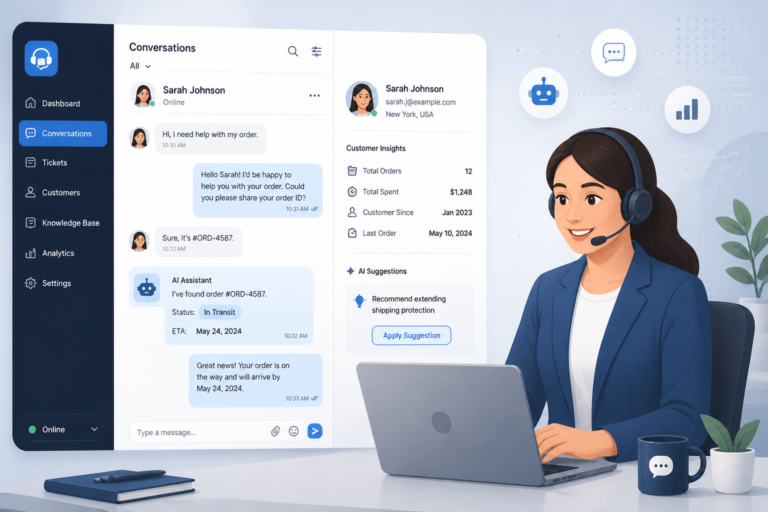
In today’s competitive eCommerce landscape, providing exceptional customer support is essential for any WooCommerce store. One effective way to enhance your support system is by utilizing specialized support apps. Among these, the Agentic Support Desk by XoBytes stands out as a powerful solution. Priced at just $19.99, this AI-powered WordPress support desk is specifically designed for software sellers, WooCommerce stores, agencies, and digital businesses. Its features help streamline customer interactions, improve response times, and ultimately boost customer satisfaction.
However, choosing the right support app can be a daunting task. With various options available, it’s crucial to understand the setup, features, and pricing of the top WooCommerce support apps. In this guide, we will explore these aspects in detail, providing you with the insights needed to make an informed decision.
Why Optimize Your WooCommerce Support?
Optimizing your WooCommerce support is not just about resolving customer queries; it’s about creating a seamless experience that enhances customer loyalty and drives sales. Customers today expect quick responses and effective solutions. Therefore, investing in the right support app can significantly improve your store’s performance.
Top WooCommerce Support Apps: Features and Benefits
To make this easier, here’s a breakdown of some of the top WooCommerce support apps, their features, and how they can benefit your store:
- Agentic Support Desk: This app offers an AI-driven ticketing system that automates responses and organizes inquiries efficiently. It’s perfect for those who manage high volumes of customer requests.
- Zendesk: Known for its robust ticket management system, Zendesk integrates seamlessly with WooCommerce, allowing you to manage customer interactions across multiple channels.
- LiveChat: This app provides real-time support and is great for increasing customer engagement. It also features automated messages to assist customers promptly.
- Freshdesk: With features like ticketing, reporting, and multi-channel support, Freshdesk helps streamline customer service operations effectively.
Setting Up Your WooCommerce Support App
Setting up a support app for your WooCommerce store is generally straightforward. Most apps provide detailed documentation to guide you through the installation process. Here’s a basic outline of the steps involved:
- Choose Your App: Select the support app that best fits your business needs.
- Install the Plugin: Most support apps offer a plugin that you can install directly from your WordPress dashboard.
- Configure Settings: Adjust the settings according to your business requirements, such as ticket priorities and automated responses.
- Integrate with WooCommerce: Ensure that the app is properly integrated with your WooCommerce store for seamless operation.
- Test the System: Before going live, conduct tests to ensure everything works as expected.
Pricing Insights for WooCommerce Support Apps
Pricing for WooCommerce support apps can vary significantly based on features and functionality. Here’s a brief overview:
- Agentic Support Desk: $19.99, providing comprehensive features suitable for small to medium-sized businesses.
- Zendesk: Pricing starts at around $5 per agent per month, making it scalable for larger teams.
- LiveChat: Plans start at $16 per month, offering various features based on your needs.
- Freshdesk: They offer a free tier, with paid plans starting at $15 per agent per month.
When choosing a support app, consider not only the pricing but also the value it brings to your business. The right app can save time, improve customer satisfaction, and ultimately increase sales.
Conclusion
In conclusion, optimizing WooCommerce support with the right apps is essential for enhancing customer service and driving sales. The Agentic Support Desk is a fantastic option that combines affordability with powerful features. As you explore different support apps, keep in mind the specific needs of your business and the expectations of your customers.
Comparative Analysis of WooCommerce Support Apps
When choosing the best WooCommerce support app for your business, it’s essential to conduct a comparative analysis of the available options. Here’s a closer look at how some of the top support apps stack up against each other:
Feature Comparison
| Feature | Agentic Support Desk | Zendesk | LiveChat | Freshdesk |
|---|---|---|---|---|
| AI Automation | Yes | No | Limited | No |
| Multi-Channel Support | Yes | Yes | Yes | Yes |
| Knowledge Base | No | Yes | No | Yes |
| Mobile App | No | Yes | Yes | Yes |
| Customizable Reports | No | Yes | No | Yes |
Use Case Scenarios
Understanding the specific use cases for each app can also guide your decision. Here are some scenarios:
- Agentic Support Desk: Ideal for small to medium-sized WooCommerce stores that require fast, automated responses to a high volume of customer inquiries.
- Zendesk: Best suited for larger enterprises that need robust reporting and multi-channel support, allowing for a comprehensive view of customer interactions.
- LiveChat: Perfect for businesses that prioritize real-time communication and customer engagement, especially in high-traffic sales periods.
- Freshdesk: A great option for startups or businesses looking to keep costs low with a free tier while still accessing essential features.
Implementation Steps for a Successful Support App Integration
Integrating a support app into your WooCommerce store requires careful planning and execution. Here are the steps to ensure a smooth implementation:
- Assess Your Needs: Determine the specific requirements of your business, such as the volume of customer inquiries and preferred communication channels.
- Choose the Right App: Based on your assessment, select a support app that aligns with your needs and budget.
- Follow Installation Guidelines: Carefully read the installation guide provided by the support app. This often includes both plugin installation and API integration steps.
- Customize Settings: Tailor the app’s settings to fit your business model, including ticket categorization, response templates, and escalation procedures.
- Train Your Team: Ensure your customer support team is familiar with the new system. Conduct training sessions to cover features and best practices.
- Monitor Performance: After implementation, keep an eye on key performance indicators (KPIs) such as response time, customer satisfaction scores, and ticket resolution rates to assess the app’s effectiveness.
Related XoBytes Products

Agentic Support Desk for WordPress by XoBytes.com
$19.99
Agentic Support Desk by Xobytes is an AI-powered WordPress support desk built for software sellers, WooCommerce stores, agencies,…

Agentic Consultant, Product Rep, & Customer Service Agent By XoBytes.com
$19.99
Agentic Consultant for WordPress gives your website a smart AI product rep, customer service agent, and hands-free voice…

Upgrades, Packages & Tiers for WooCommerce By XoBytes.com
$25.00
This is a FREEMIUM plugin. Get the free version “Upgrades, Packages & Tiers for WooCommerce By XoBytes.com” Pro…
License manager for WooCommerce by XoBytes.com
$25.00
Xobytes License Manager for WooCommerce is a powerful WooCommerce license manager plugin that lets you sell software licenses,…

Tamper Guard by XoBytes | WordPress Plugin Tamper Detector
$25.00
Protect your commercial WordPress plugins with license-based tamper detection, file integrity monitoring, automatic shutdown protection, and site reporting.…

Agentic Construction Theme | More than just a theme | Built for all trades
$49.99
Why You Need This Theme And Plugin! Click here for the Demo Agentic Construction Theme by XoBytes is…
Product 1 of 6
Decision Criteria for Selecting a WooCommerce Support App
To make an informed choice, consider the following criteria when evaluating support apps:
- Scalability: Ensure the app can grow with your business, accommodating increased customer inquiries as your store expands.
- Integration Capabilities: Look for apps that seamlessly integrate with existing tools and platforms you use, such as CRM systems and email marketing tools.
- User Experience: Choose an app with an intuitive user interface that minimizes the learning curve for your team.
- Customer Support: Evaluate the level of support provided by the app vendor, including access to resources, training, and customer service.
- Reviews and Reputation: Research user reviews and case studies to gauge the app’s performance and reliability in real-world scenarios.
Practical Examples of Successful WooCommerce Support Implementations
To better understand the impact of effective support apps, let’s look at a couple of real-world examples where WooCommerce stores have successfully optimized their customer service:
For additional authoritative context, review Facebook.
Case Study: Eco-Friendly Products Store
A small business specializing in eco-friendly products integrated the Agentic Support Desk into their WooCommerce site. By utilizing its AI-driven ticketing system, they managed to reduce response times from 24 hours to just 2 hours. This improvement not only enhanced customer satisfaction but also increased repeat purchases by 30% within three months.
Continue with Optimizing WooCommerce Support with Effective Helpdesk Solutions for additional XoBytes guidance.
Case Study: Fashion Retailer
A mid-sized fashion retailer opted for Zendesk to manage their customer support across multiple channels, including email and social media. The comprehensive reporting features allowed them to identify common customer issues, leading to proactive changes in their product descriptions and return policies. As a result, they saw a 25% decrease in return inquiries and a significant boost in customer loyalty.
Implementing Best Practices for Customer Support
To maximize the effectiveness of your chosen WooCommerce support app, consider the following best practices:
- Regular Training: Continuously train your support team on the latest features and updates of the support app to ensure they are utilizing it to its full potential.
- Customer Feedback: Actively seek feedback from customers regarding their support experience. Use this information to make necessary adjustments to your processes.
- Knowledge Base Development: Create a comprehensive knowledge base that customers can access for common queries. This not only reduces the number of tickets but also empowers customers to find solutions independently.
- Utilize Analytics: Regularly review analytics provided by your support app to identify trends and areas for improvement. This data can help you refine your support strategies over time.
Advanced Features to Look For in WooCommerce Support Apps
When evaluating support apps, consider looking for advanced features that can further enhance your customer service capabilities:
- Chatbots: Some apps offer AI-driven chatbots that can handle basic inquiries, allowing your support team to focus on more complex issues.
- Integration with CRM: Ensure the support app can integrate with your Customer Relationship Management (CRM) system for a unified view of customer interactions.
- Customizable Workflows: Look for apps that allow you to create custom workflows based on your business needs, such as ticket escalation and prioritization.
- Multi-Language Support: If you serve a global customer base, consider support apps that offer multi-language capabilities to cater to diverse audiences.
Evaluating Long-Term Value of Support Apps
As you assess different WooCommerce support apps, it’s crucial to evaluate their long-term value. Here are some factors to consider:
- Return on Investment (ROI): Measure the ROI by analyzing improvements in customer satisfaction, reduced support costs, and increased sales.
- Longevity of Features: Ensure that the features offered are not only relevant today but will also remain beneficial as your business evolves.
- Vendor Stability: Investigate the vendor’s history and reputation in the market to ensure they will continue to provide updates and support in the future.
Frequently Asked Questions
Here are some common questions regarding WooCommerce support apps:
What are the key features to look for in a WooCommerce support app?
Key features include ticket management, live chat, multi-channel support, automation, knowledge base integration, and seamless WooCommerce integration.
How do I integrate a support app with my WooCommerce store?
Most support apps provide plugin options or API integrations that connect directly with WooCommerce. Follow the setup guides provided by the support app to ensure proper configuration.
What are the benefits of using a dedicated support app for WooCommerce?
Dedicated support apps improve response times, automate support workflows, centralize inquiries, and enhance overall customer satisfaction, leading to increased loyalty and sales.