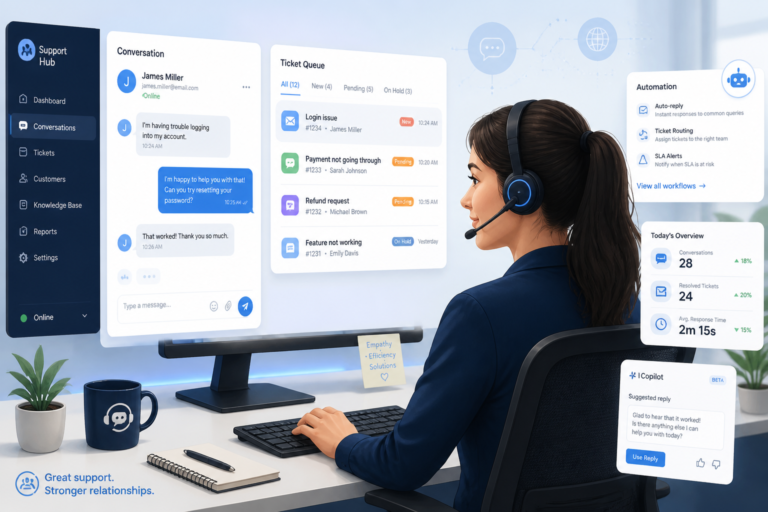
In today’s fast-paced online shopping environment, providing excellent customer support is crucial for any WooCommerce store. Therefore, optimizing WooCommerce support with effective helpdesk solutions can significantly enhance your customer experience. This article will explore various helpdesk solutions, best practices for implementation, and how to automate your support processes to boost efficiency and satisfaction.
Understanding WooCommerce Support Needs
WooCommerce is one of the most popular eCommerce platforms, but managing customer inquiries can be challenging. Customers expect prompt responses and effective solutions to their issues. As a result, integrating a helpdesk solution tailored to WooCommerce can streamline your support system. For example, tools like Agentic Support Desk leverage AI to automate responses and manage tickets efficiently.
Benefits of Helpdesk Solutions for WooCommerce
Adopting an effective helpdesk solution offers numerous advantages:
- Improved Response Times: Automated ticketing systems ensure that customer inquiries are addressed promptly.
- Streamlined Ticket Management: Helpdesk solutions organize and prioritize tickets, making it easier for support teams to handle inquiries.
- Enhanced Customer Satisfaction: Quick, organized responses lead to happier customers and increased loyalty.
Choosing the Right Helpdesk Plugin
When selecting a helpdesk plugin for your WooCommerce store, consider the following factors:
- Integration Capabilities: Ensure the plugin integrates seamlessly with WooCommerce and other tools you use.
- Automation Features: Look for features such as auto-responses, ticket routing, and AI chatbots to enhance efficiency.
- Security Features: Choose plugins that prioritize security to protect customer data, such as Tamper Guard.
Implementing Helpdesk Solutions
To implement a helpdesk solution effectively, follow these steps:
- Conduct an Audit: Assess your current support processes to identify gaps and areas for improvement.
- Select a Plugin: Choose a plugin that meets your needs, such as the Agentic Support Desk.
- Customize Workflows: Tailor the support workflows to align with your business model and customer expectations.
- Train Your Team: Ensure your support team is well-trained on the new system to maximize its effectiveness.
Automating Customer Support
Automation is key to optimizing WooCommerce support. To make this easier, consider these automation strategies:
- AI Chatbots: Implement chatbots to handle common inquiries and provide instant responses.
- Auto-Responses: Set up auto-replies for frequently asked questions to reduce response time.
- Ticket Routing: Use automated ticket routing to direct inquiries to the appropriate support agents based on their expertise.
Monitoring and Improving Support Performance
Once your helpdesk solution is in place, it’s essential to monitor its performance. Regularly review ticket resolution times, customer feedback, and support team efficiency. Because of this, you can make data-driven decisions to improve your support processes.
Security Best Practices for Helpdesk Solutions
Security should always be a priority when implementing helpdesk solutions. Here are some best practices:
- Regular Updates: Keep your helpdesk plugins updated to protect against vulnerabilities.
- Use Security Plugins: Implement plugins like Tamper Guard to monitor and protect your support files.
- Data Encryption: Ensure that all customer data is encrypted during transmission and storage.
Conclusion
In conclusion, optimizing WooCommerce support with effective helpdesk solutions is vital for enhancing customer satisfaction and operational efficiency. By choosing the right plugin, automating processes, and implementing security best practices, you can significantly improve your customer support experience. Start exploring your options today!
Advanced Features to Look for in Helpdesk Solutions
When selecting a helpdesk solution for your WooCommerce store, it’s essential to consider advanced features that can further enhance your customer support capabilities. Here are some key features to look for:
- Multi-Channel Support: Ensure the helpdesk solution allows you to manage customer inquiries from various channels, including email, live chat, social media, and phone. This versatility ensures customers can reach you through their preferred method.
- Knowledge Base Integration: A built-in knowledge base enables customers to find answers to common questions independently, reducing the volume of support tickets and empowering users.
- Customizable Reporting: Look for solutions that offer robust reporting features, allowing you to analyze customer interactions, ticket resolution times, and team performance to make informed decisions.
- Mobile Accessibility: A mobile-friendly helpdesk solution can enable your support team to respond to inquiries on the go, ensuring that customer issues are resolved quickly, even outside of regular business hours.
Practical Examples of Helpdesk Solutions
To better understand how helpdesk solutions can optimize WooCommerce support, let’s take a look at a few practical examples:
Example 1: Using AI Chatbots for 24/7 Support
Imagine a WooCommerce store that sells fashion items. By implementing an AI chatbot, the store can provide 24/7 support to customers. The chatbot can answer common questions about sizing, shipping, and return policies, freeing up human agents to tackle more complex inquiries during peak hours.
For a practical companion to this section, explore Best WooCommerce Helpdesk Apps to Streamline Customer Support in 2026.
Example 2: Integrating a Knowledge Base
A WooCommerce electronics store could integrate a knowledge base into its helpdesk solution. This knowledge base would include articles and tutorials on product setup, troubleshooting, and warranty information. Customers can access this resource to solve their issues independently, leading to reduced ticket volume and improved customer satisfaction.
Related XoBytes Products

Agentic Support Desk for WordPress by XoBytes.com
$19.99
Agentic Support Desk by Xobytes is an AI-powered WordPress support desk built for software sellers, WooCommerce stores, agencies,…

Tamper Guard by XoBytes | WordPress Plugin Tamper Detector
$25.00
Protect your commercial WordPress plugins with license-based tamper detection, file integrity monitoring, automatic shutdown protection, and site reporting.…

Agentic Consultant, Product Rep, & Customer Service Agent By XoBytes.com
$19.99
Agentic Consultant for WordPress gives your website a smart AI product rep, customer service agent, and hands-free voice…

Plugin Update Server for WordPress by XoBytes.com
$25.00
Plugin Update Server by XoBytes lets WordPress plugin sellers deliver private plugin updates directly to customer dashboards. Upload…

AI SEO Data & Automatic Blog Writer for WordPress by XoBytes
$19.99
Turn your WordPress site, Google Search Console data, and SEO opportunities into smarter blog posts, pages, titles, meta…
License manager for WooCommerce by XoBytes.com
$25.00
Xobytes License Manager for WooCommerce is a powerful WooCommerce license manager plugin that lets you sell software licenses,…
Product 1 of 6
Implementation Steps for a Helpdesk Solution
Implementing a helpdesk solution effectively requires careful planning and execution. Here’s a step-by-step guide to help you through the process:
- Define Your Support Goals: Clearly outline what you want to achieve with your helpdesk solution. Are you looking to reduce response times, improve customer satisfaction, or streamline ticket management?
- Research and Compare Solutions: Take the time to research different helpdesk solutions. Compare features, pricing, and user reviews to find the best fit for your WooCommerce store.
- Set Up the Helpdesk: Once you’ve chosen a solution, follow the installation instructions to set it up. Customize the settings to align with your support goals.
- Train Your Team: Organize training sessions for your support team to familiarize them with the new helpdesk system. Ensure they understand how to use all features effectively.
- Launch and Monitor: After training, launch the helpdesk solution. Monitor its performance closely during the initial rollout to identify any issues that need addressing.
Comparing Popular Helpdesk Solutions for WooCommerce
To help you make an informed decision, here’s a comparison of three popular helpdesk solutions for WooCommerce:
| Feature | Agentic Support Desk | Zendesk | Freshdesk |
|---|---|---|---|
| Multi-Channel Support | Yes | Yes | Yes |
| AI Chatbot | Yes | Yes | No |
| Knowledge Base | Yes | Yes | Yes |
| Custom Reporting | Yes | Yes | Yes |
| Mobile App | No | Yes | Yes |
By comparing features, you can determine which helpdesk solution best meets your specific needs and budget.
Enhancing Customer Communication with Helpdesk Solutions
Effective communication is at the heart of excellent customer support. Helpdesk solutions can enhance communication in several ways:
- Personalized Responses: Use customer data to tailor responses, making customers feel valued and understood.
- Follow-Up Automation: Automate follow-up emails after ticket resolution to ensure customer satisfaction and gather feedback.
- Real-Time Notifications: Enable notifications for both customers and support agents to keep everyone updated on ticket status.
Integrating Helpdesk Solutions with Other Tools
To fully optimize your WooCommerce support, consider integrating your helpdesk solution with other essential tools:
Continue with Boost Your WooCommerce Store: Top Customer Support Plugins & Features for additional XoBytes guidance.
- CRM Systems: Integrate with Customer Relationship Management (CRM) systems to maintain a comprehensive view of customer interactions.
- Email Marketing Tools: Link your helpdesk with email marketing platforms to send targeted campaigns based on customer inquiries.
- Analytics Platforms: Use analytics tools to track customer behavior and support trends, helping you refine your support strategies.
Practical Implementation Tips for Helpdesk Solutions
When implementing a helpdesk solution, consider these practical tips to ensure success:
- Start Small: Begin with a pilot program to test the helpdesk solution with a limited number of users before a full rollout.
- Gather Feedback: After the pilot, collect feedback from both customers and support agents to identify areas for improvement.
- Iterate and Improve: Continuously refine your processes based on feedback and performance metrics to enhance the support experience.
Comparative Analysis of Helpdesk Solutions
When comparing helpdesk solutions, consider the following criteria to make an informed decision:
- Usability: Evaluate the user interface and ease of use for both agents and customers.
- Scalability: Ensure the solution can grow with your business and handle increased ticket volumes as your customer base expands.
- Cost-Effectiveness: Analyze pricing structures, including any hidden fees, to find a solution that fits your budget without sacrificing features.
Case Studies of Successful Helpdesk Implementations
Examining real-world examples can provide valuable insights:
Case Study 1: Fashion Retailer
A fashion retailer implemented a helpdesk solution that integrated AI chatbots. As a result, they reduced average response times from 12 hours to under 1 hour, leading to a 30% increase in customer satisfaction ratings.
Case Study 2: Electronics Store
An electronics store utilized a knowledge base feature within their helpdesk. This led to a 40% decrease in support tickets as customers found answers to their questions independently, freeing up agents to handle more complex issues.
Frequently Asked Questions
Here are some common questions about WooCommerce support and helpdesk solutions:
- What are the best WordPress plugins for WooCommerce customer support? Popular options include Agentic Support Desk, which offers AI-powered support automation, ticket management, and integration capabilities tailored for WooCommerce stores.
- How can I automate customer support for my WooCommerce webshop? Using support desk plugins with automation features, such as ticket routing, auto-replies, and AI chatbots, can significantly streamline support workflows and improve response times.
- What security considerations are important when implementing a helpdesk in WooCommerce? Ensure plugins like Tamper Guard are used to protect support-related files, and regularly update your support plugins to prevent tampering and security breaches.
- Can helpdesk plugins improve customer satisfaction in WooCommerce? Yes, by providing faster, more organized, and automated support, helpdesk plugins can enhance customer experience and foster loyalty.