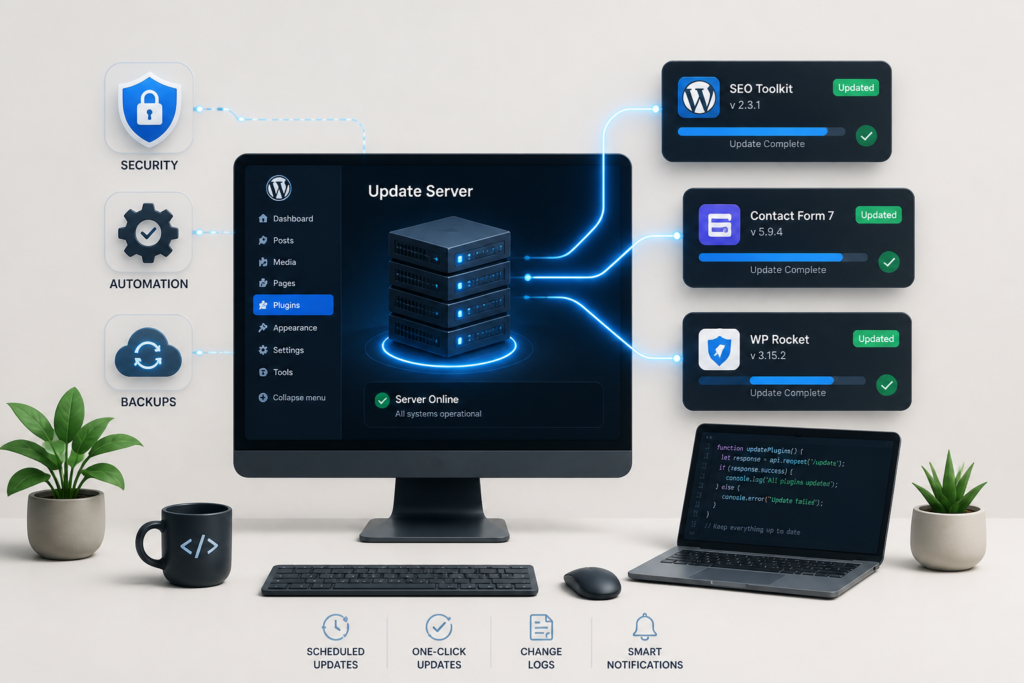
In today’s competitive digital landscape, delivering secure and efficient updates for your WordPress plugins is essential. With the Plugin Update Server by XoBytes, you can streamline your plugin delivery process and enhance security. This powerful tool enables plugin sellers to manage updates directly from their own server, ensuring that users receive timely updates while maintaining control over the update process.
In this tutorial, we will explore how to set up a custom update server for your WordPress plugins. We will cover everything from installation to best practices for license activation and product mapping. By the end of this guide, you will have the knowledge needed to boost your WordPress plugin delivery effectively.
Why Use a Custom Update Server?
Using a custom update server offers several advantages over the default WordPress update system. First, it enhances security by allowing you to control who has access to your updates. Additionally, it facilitates license management, making it easier to enforce licensing agreements and track user access. Finally, a custom update server can improve update delivery speed, ensuring your users get the latest features and fixes without delay.
Setting Up Your Custom Update Server
To get started with your custom update server, follow these steps:
- Purchase the Plugin Update Server: Visit XoBytes to purchase the Plugin Update Server for just $25.00.
- Install the Plugin: After purchasing, download the plugin and install it on your WordPress site.
- Configure Settings: Access the plugin settings to configure your update server. You will need to set up your license management options and specify the directories for your plugin files.
- Upload Your Plugin Files: Use the built-in upload feature to add your plugin ZIP files to the server.
- Activate Licenses: Ensure that your licensing system is integrated with your update server to manage user access effectively.
By following these steps, you will have a fully operational custom update server that enhances your WordPress plugin delivery.
Best Practices for Using Your Custom Update Server
To maximize the benefits of your custom update server, consider the following best practices:
- Regular Updates: Keep your plugins updated regularly to ensure users receive the latest features and security patches.
- Secure Your Server: Implement security measures, such as SSL certificates and secure access protocols, to protect your update server.
- Monitor User Feedback: Encourage users to provide feedback on updates to identify any issues quickly.
- Document Your Process: Maintain clear documentation on how to use the update server for both your team and your users.
Who Should Use a Custom Update Server?
A custom update server is ideal for:
- Plugin developers who want to maintain control over their updates.
- Businesses that sell premium plugins and need a secure way to manage licenses.
- Agencies that provide custom solutions and require tailored update management for clients.
However, individual users or small-scale plugin developers may find the default WordPress update system sufficient for their needs.
Advanced Configuration Options
Once you have your custom update server set up, you may want to explore advanced configuration options that can further enhance your plugin delivery process. Here are some key features to consider:
Version Control
Implementing version control for your plugins is crucial. This allows you to track changes, revert to previous versions if necessary, and maintain a clear history of updates. Consider using a version control system like Git to manage your plugin files effectively.
Custom Update Messages
Personalizing update messages can improve user experience. You can customize the messages that users receive when updates are available, providing context about what has changed or why the update is important. This can be done within the plugin settings.
Related XoBytes Products
Plugin Update Server for WordPress by XoBytes.com
$25.00
Plugin Update Server by XoBytes lets WordPress plugin sellers deliver private plugin updates directly to customer dashboards. Upload…

Agentic Support Desk for WordPress by XoBytes.com
$19.99
Agentic Support Desk by Xobytes is an AI-powered WordPress support desk built for software sellers, WooCommerce stores, agencies,…

Upgrades, Packages & Tiers for WooCommerce By XoBytes.com
$25.00
This is a FREEMIUM plugin. Get the free version "Upgrades, Packages & Tiers for WooCommerce By XoBytes.com" Pro…
License manager for WooCommerce by XoBytes.com
$25.00
Xobytes License Manager for WooCommerce is a powerful WooCommerce license manager plugin that lets you sell software licenses,…

Social Media Autopilot With AI by XoBytes.com
$19.99
Xobytes Social Autopilot is a WordPress social media autoposter that helps schedule and promote posts, pages, WooCommerce products,…

AI SEO Data & Automatic Blog Writer for WordPress by XoBytes
$19.99
Turn your WordPress site, Google Search Console data, and SEO opportunities into smarter blog posts, pages, titles, meta…
Product 1 of 6
For a practical companion to this section, explore Step-by-Step Guide to Streamlining WordPress Plugin Updates Efficiently.
Testing Environment
Before rolling out updates to all users, consider setting up a staging environment. This allows you to test updates in a controlled setting to ensure compatibility and functionality before they go live.
Performance Optimization Techniques
To ensure your custom update server runs smoothly and efficiently, consider the following performance optimization techniques:
- Use a Content Delivery Network (CDN): A CDN can help distribute your plugin files across multiple servers, reducing load times and improving download speeds for users worldwide.
- Optimize File Sizes: Compress your plugin files where possible to reduce their size, making them quicker to download and install.
- Regularly Monitor Server Performance: Utilize monitoring tools to keep an eye on server performance and identify any bottlenecks that may affect update delivery.
Integrating with Other Tools
Your custom update server can be integrated with various tools to enhance functionality and streamline processes. Here are a few integrations to consider:
Analytics Tools
Integrate analytics tools to track how users are interacting with your plugin updates. This data can provide insights into user behavior, helping you make informed decisions about future updates.
For additional authoritative context, review LinkedIn.
Customer Relationship Management (CRM) Systems
Linking your update server with a CRM can help manage customer interactions and support requests more effectively. This integration can streamline communication and improve user satisfaction.
Case Study: Successful Implementation
To illustrate the benefits of a custom update server, let’s look at a hypothetical case study of a plugin developer:
Continue with Customer Support Plugins to Boost WordPress Efficiency for additional XoBytes guidance.
Background
A small team developed a premium plugin for e-commerce sites. Initially, they used the default WordPress update system, but faced challenges with security and license management.
Implementation
After implementing a custom update server using XoBytes, they were able to:
- Enhance security by controlling access to updates.
- Improve update delivery speed, reducing user complaints about outdated versions.
- Implement a robust license management system that allowed them to track user access and enforce licensing agreements.
Results
Within three months, the team reported a 40% increase in user satisfaction due to faster updates and improved security. They also saw a decrease in support requests related to update issues.
Future Trends in Plugin Delivery
As technology evolves, so too will the methods for delivering WordPress plugins. Here are a few trends to watch:
- Automated Updates: Expect to see more automation in the update process, allowing developers to push updates seamlessly without user intervention.
- Increased Focus on Security: With rising cybersecurity threats, plugin developers will need to prioritize security in their update processes.
- Enhanced User Experience: Future updates will likely focus on improving user experience, including better interfaces and more informative update notifications.
Frequently Asked Questions
Here are some common questions about setting up a custom WordPress plugin update server:
Frequently Asked Questions
- What is a WordPress plugin update server? A WordPress plugin update server is a private or custom system that delivers plugin updates directly to users, bypassing the official WordPress repository, enabling secure, license-based updates.
- How does the Plugin Update Server by XoBytes work? It allows plugin sellers to upload release ZIP files, activate licenses, and deliver private updates directly to customer dashboards, streamlining the update process and enhancing security.
- Can I use this setup for WooCommerce digital products? Yes, integrating the Plugin Update Server with WooCommerce license management ensures secure, automated updates for your digital products sold via WooCommerce.
- What are the benefits of a custom update server over the default WordPress update system? A custom update server offers increased security, license enforcement, faster delivery, and control over plugin updates, especially useful for premium or proprietary plugins.
Conclusion
Setting up a custom update server for your WordPress plugins can significantly enhance your delivery process, improve security, and streamline license management. With the Plugin Update Server by XoBytes, you are equipped to provide a seamless experience for your users. Don’t wait; start boosting your WordPress plugin delivery today!
Leave a Reply