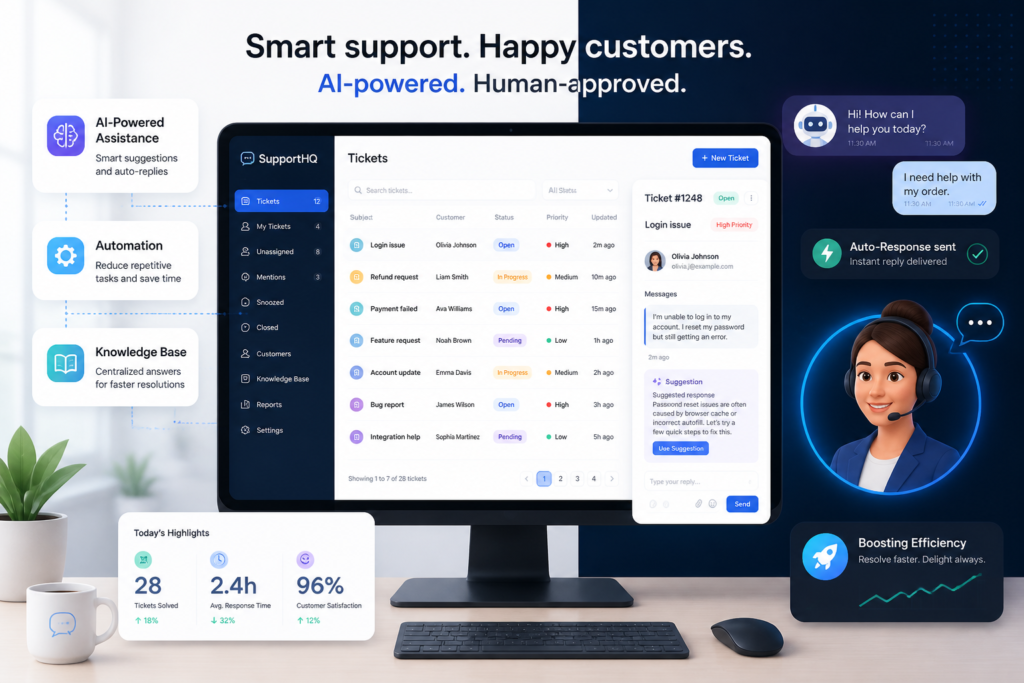
In today’s fast-paced digital world, managing customer support effectively is crucial for any business. The Agentic Support Desk for WordPress provides an innovative solution to streamline support tickets and enhance customer service. This AI-powered plugin not only automates ticket management but also improves response times and customer satisfaction. For just $19.99, you can transform your support process and give your customers the immediate assistance they need.
Moreover, by integrating the Agentic Consultant, Product Rep, & Customer Service Agent into your WordPress site, you can further enhance your customer service capabilities. This tool acts as a smart AI representative, managing inquiries and providing instant responses to common questions, allowing your team to focus on more complex issues.
Why Choose Agentic Support Desk?
Choosing the right support desk plugin is essential for any WordPress site, especially for those operating eCommerce stores through WooCommerce. The Agentic Support Desk offers several features that set it apart:
- AI Automation: Automates routine inquiries and ticket management, freeing up your support team.
- Seamless Integration: Works flawlessly with WooCommerce, enhancing the support experience for eCommerce businesses.
- Improved Response Times: Provides instant answers to common questions, reducing wait times for customers.
- Customizable Workflows: Tailor the support process to fit your business needs and customer expectations.
To make this easier, let’s explore how Agentic Support Desk can specifically benefit different types of businesses:
Benefits for Different Business Types
- Small Businesses: Ideal for small teams looking to automate support without a large budget.
- eCommerce Stores: Perfect for online retailers needing efficient order-related support.
- Agencies: Helps agencies manage multiple client inquiries efficiently.
Key Features of Agentic Support Desk
The Agentic Support Desk is packed with features designed to enhance customer experience:
- Ticket Management: Organizes and prioritizes support requests efficiently.
- AI-Powered Assistance: Provides instant responses to frequently asked questions.
- Escalation Features: Automatically escalates complex issues to human agents when necessary.
- Reporting and Analytics: Offers insights into support performance and customer satisfaction.
As a result, businesses can expect to see improved efficiency and customer satisfaction.
How to Get Started
Getting started with Agentic Support Desk is simple. You can try it free for seven days, allowing you to assess its features and fit for your business needs. After the trial, it’s available for just $19.99 per month, which is a small investment for the value it brings.
To view the product and start your trial, visit the Agentic Support Desk product page today.
Practical Implementation Steps for Agentic Support Desk
Integrating the Agentic Support Desk into your WordPress site is straightforward. Here are the essential steps to get you started:
For a practical companion to this section, explore Boost Customer Support Efficiency with Agentic Support Desk for WordPress.
- Install the Plugin: Go to your WordPress dashboard, navigate to the ‘Plugins’ section, and click on ‘Add New.’ Search for ‘Agentic Support Desk’ and click ‘Install Now.’ Once installed, click ‘Activate.’
- Configure Settings: After activation, you will find a new menu item for Agentic Support Desk. Click on it to access the settings. Here, you can customize your ticket management preferences, AI responses, and escalation protocols.
- Integrate with WooCommerce: If you operate an eCommerce store, ensure you link your WooCommerce account within the Agentic settings. This will enable the plugin to manage order-related inquiries seamlessly.
- Set Up AI Responses: Customize the AI responses by adding common questions and answers relevant to your business. This will help the AI provide accurate and helpful information to your customers.
- Test the System: Before going live, conduct tests to ensure that the ticket management and AI responses are functioning correctly. You can simulate customer inquiries to see how the system handles them.
Comparative Analysis: Agentic Support Desk vs. Other Support Solutions
When choosing a support desk solution, it’s essential to compare features, pricing, and overall value. Here’s how Agentic Support Desk stacks up against other popular options:
| Feature | Agentic Support Desk | Competitor A | Competitor B |
|---|---|---|---|
| AI Automation | Yes | No | Yes |
| WooCommerce Integration | Seamless | Limited | No |
| Customizable Workflows | Yes | Yes | No |
| Free Trial | 7 Days | 14 Days | No |
| Price | $19.99/month | $29.99/month | $24.99/month |
Real-World Success Stories
Many businesses have successfully transformed their customer support operations using the Agentic Support Desk. Here are a couple of examples:
- Small Business Case Study: A local bakery implemented the Agentic Support Desk to handle customer inquiries about orders and delivery times. Within weeks, they reported a 40% reduction in response time, allowing their small team to focus on baking rather than managing emails.
- eCommerce Success: An online clothing retailer integrated the support desk and saw a 30% increase in customer satisfaction ratings. The AI was able to handle common questions about sizing and returns, freeing up human agents to tackle more complex issues.
Related XoBytes Products

Agentic Consultant, Product Rep, & Customer Service Agent By XoBytes.com
$19.99
Agentic Consultant for WordPress gives your website a smart AI product rep, customer service agent, and hands-free voice…

Agentic Support Desk for WordPress by XoBytes.com
$19.99
Agentic Support Desk by Xobytes is an AI-powered WordPress support desk built for software sellers, WooCommerce stores, agencies,…

Agent Shield by XoBytes | Protect against agentic software
$25.00
AgentShield is a WordPress AI Agent Firewall that helps detect, monitor, block, and temporarily ban AI crawlers, AI…

Upgrades, Packages & Tiers for WooCommerce By XoBytes.com
$25.00
This is a FREEMIUM plugin. Get the free version "Upgrades, Packages & Tiers for WooCommerce By XoBytes.com" Pro…

AI SEO Data & Automatic Blog Writer for WordPress by XoBytes
$19.99
Turn your WordPress site, Google Search Console data, and SEO opportunities into smarter blog posts, pages, titles, meta…
Plugin Update Server for WordPress by XoBytes.com
$25.00
Plugin Update Server by XoBytes lets WordPress plugin sellers deliver private plugin updates directly to customer dashboards. Upload…
Product 1 of 6
Decision Criteria for Choosing a Support Desk
When selecting a support desk solution, consider the following criteria to ensure it meets your business needs:
- Feature Set: Does it offer the features necessary for your specific requirements, such as AI automation and ticket management?
- Integration Capabilities: Can it easily integrate with your existing systems, like WooCommerce or CRM tools?
- User Experience: Is the interface user-friendly for both your support team and customers?
- Cost-effectiveness: Does the pricing align with your budget while still providing value?
- Customer Support: What kind of support does the provider offer if you encounter issues?
Advanced Features to Enhance Customer Interaction
In addition to the core functionalities, the Agentic Support Desk offers several advanced features that can further enhance customer interaction and support efficiency. Here are some notable features:
Continue with Support Plugins for WordPress: Streamline Customer Service & Ticketing for additional XoBytes guidance.
- Multi-Channel Support: Manage inquiries from various channels such as email, social media, and live chat all in one place, ensuring no customer query goes unanswered.
- Canned Responses: Create a library of pre-written responses for common inquiries, allowing your support team to respond quickly and consistently.
- Customer Feedback Collection: Implement post-interaction surveys to gather feedback, helping you to continuously improve your support processes.
Best Practices for Maximizing the Use of Agentic Support Desk
To get the most out of your Agentic Support Desk, consider these best practices:
- Regularly Update AI Responses: As your business grows and changes, so should your AI responses. Regular updates ensure that your AI remains relevant and helpful.
- Train Your Team: Provide training sessions for your support team to familiarize them with the plugin’s features and functionalities, ensuring they can utilize it to its fullest potential.
- Monitor Performance Metrics: Use the reporting and analytics features to track key performance indicators (KPIs) such as response times and customer satisfaction rates. Adjust your strategies based on these insights.
Case Study: Enhancing Customer Support with Agentic Support Desk
Consider the example of a mid-sized tech company that adopted the Agentic Support Desk to manage their customer inquiries. Before implementing the system, they faced challenges with high ticket volumes and slow response times. After integrating the support desk, they experienced:
- A 50% reduction in average response time due to AI automation handling routine inquiries.
- An increase in customer satisfaction scores by 35%, as customers appreciated the quick and accurate responses.
- Improved team morale, as support agents could focus on more challenging issues instead of repetitive tasks.
Integrating Agentic Support Desk with Other Tools
To further streamline your support operations, consider integrating the Agentic Support Desk with other essential tools:
- CRM Systems: Sync customer data to provide personalized support and track customer interactions across platforms.
- Email Marketing Tools: Use customer insights from support interactions to tailor marketing campaigns and improve customer engagement.
- Project Management Software: Track support tickets related to ongoing projects, ensuring that team members are aware of customer feedback and issues.
Future-Proofing Your Support Strategy
As technology evolves, so do customer expectations. To future-proof your support strategy, consider the following:
- Stay Informed on AI Advancements: Keep an eye on emerging AI technologies that can enhance your support capabilities further.
- Adapt to Customer Preferences: Regularly assess how your customers prefer to communicate and adapt your support channels accordingly.
- Invest in Continuous Improvement: Allocate resources for ongoing training and tool upgrades to ensure your support remains efficient and effective.
Frequently Asked Questions
Here are some common questions about the Agentic Support Desk:
Frequently Asked Questions
- What is Agentic Support Desk for WordPress?
Agentic Support Desk is an AI-powered customer support plugin for WordPress that offers ticket management, AI assistance, and escalation features to streamline support workflows. - How does AI improve customer support on WordPress sites?
AI automates routine support tasks, provides instant responses, and escalates complex issues to human agents, reducing response times and increasing customer satisfaction. - Can Agentic Support Desk integrate with WooCommerce?
Yes, Agentic Support Desk seamlessly integrates with WooCommerce, allowing support automation for eCommerce stores and order-related inquiries. - Is there a free trial available for Agentic Support Desk?
Yes, Agentic Support Desk offers a 7-day free trial to test its features before subscribing at $19.99/month.
In conclusion, if you are looking to streamline your support tickets and enhance customer service on your WordPress site, the Agentic Support Desk is a powerful solution. With its AI capabilities, seamless integration, and user-friendly interface, it can significantly improve your customer support operations.
Don’t miss out on the opportunity to elevate your customer service. Try Agentic Support Desk today!
Leave a Reply