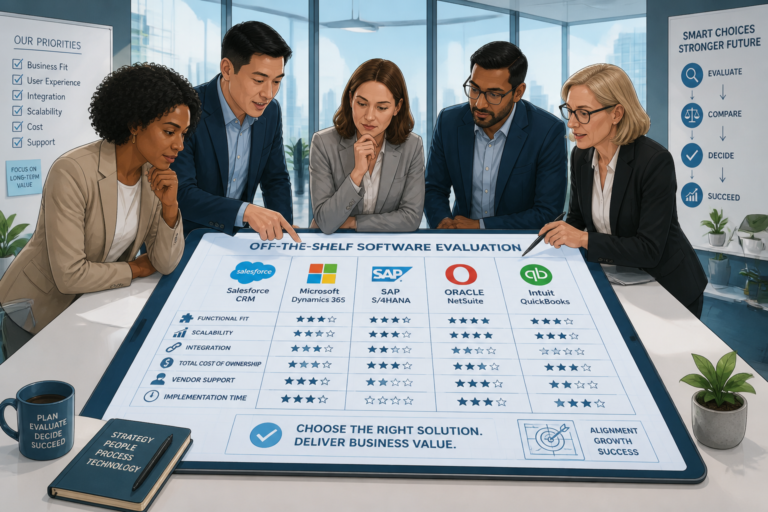
In today’s fast-paced business environment, choosing the right software can significantly impact your operations. Evaluating off-the-shelf software is a common approach for many organizations. This guide will explore key considerations that can help you make informed decisions when selecting software solutions for your business.
Understanding Off-the-Shelf Software
Off-the-shelf software refers to pre-packaged software solutions designed to meet the needs of a broad audience. Unlike custom software, which is tailored to specific business requirements, off-the-shelf options offer quick deployment and cost-effective solutions. Because of this, many businesses opt for off-the-shelf software to streamline their operations and reduce expenses.
For example, popular off-the-shelf software solutions include Microsoft Office for productivity, Adobe Creative Suite for design, and various CRM systems like Salesforce. These applications are designed to cater to general business needs and can be easily integrated into existing workflows.
For useful background on this topic, see Choosing Between Off-the-Shelf Software and Custom Solutions.
Key Considerations for Evaluation
When evaluating off-the-shelf software, there are several critical factors to consider:
- Cost: Assess the initial purchase price and any ongoing subscription or licensing fees. Off-the-shelf software often has lower upfront costs compared to custom solutions.
- Functionality: Ensure the software meets your business needs. Look for features that align with your operational requirements.
- Scalability: Determine if the software can grow with your business. Scalability is essential for adapting to future changes.
- Support and Updates: Evaluate the level of customer support and frequency of software updates. Reliable support can prevent potential issues down the line.
- Integration: Consider how well the software integrates with your existing systems and tools. Seamless integration can enhance productivity.
Pros and Cons of Off-the-Shelf Software
To help you further understand off-the-shelf software, let’s examine its advantages and disadvantages:
Advantages
- Cost-Effective: Generally, off-the-shelf software is more affordable than custom solutions, making it accessible for businesses of all sizes.
- Quick Implementation: These solutions can be deployed rapidly, allowing businesses to start using them almost immediately.
- Proven Reliability: Off-the-shelf software is often used by many organizations, which means it has been tested and refined over time.
Disadvantages
- Limited Customization: Off-the-shelf solutions may not offer the specific features your business requires.
- Potential Mismatch: The software may not perfectly align with your business processes, leading to inefficiencies.
- Scalability Issues: Some off-the-shelf software may struggle to accommodate rapid growth or unique business needs.
Making the Right Choice
To make a well-informed decision, it’s crucial to weigh the pros and cons of off-the-shelf software against your specific needs. Consider developing a checklist that includes your must-have features, budget constraints, and long-term goals. This approach will help you narrow down your options effectively.
In addition, you might want to review case studies or examples of how other businesses have successfully implemented off-the-shelf solutions. For instance, this article provides insights into how various companies have leveraged off-the-shelf software to enhance their operations.
Conclusion
Evaluating off-the-shelf software is a critical step for any business looking to improve efficiency and reduce costs. By considering the factors outlined in this guide, you can make informed decisions that align with your business goals.
Practical Steps for Evaluating Off-the-Shelf Software
To ensure a comprehensive evaluation of off-the-shelf software, follow these practical steps:
- Define Your Requirements: Start by outlining your business needs and objectives. Engage stakeholders from different departments to gather insights on what features are essential.
- Research Available Options: Compile a list of potential off-the-shelf software solutions. Utilize online reviews, software comparison websites, and recommendations from industry peers to identify viable candidates.
- Request Demos: Reach out to software vendors and request demonstrations. This allows your team to see the software in action and evaluate its usability and functionality.
- Trial Periods: Take advantage of free trials or limited-time offers to test the software in your environment. This hands-on experience is invaluable for assessing compatibility with your workflows.
- Gather Feedback: After testing, collect feedback from users who interacted with the software. Their insights will help you gauge the software’s effectiveness and user satisfaction.
- Evaluate Vendor Reputation: Investigate the software vendor’s history, customer support reputation, and update frequency. Reliable vendors are more likely to provide ongoing support and improvements.
Related XoBytes Products

Agentic Construction Theme | More than just a theme | Built for all trades
$49.99
Why You Need This Theme And Plugin! Click here for the Demo Agentic Construction Theme by XoBytes is…

Agentic Consultant, Product Rep, & Customer Service Agent By XoBytes.com
$19.99
Agentic Consultant for WordPress gives your website a smart AI product rep, customer service agent, and hands-free voice…

Agentic Support Desk for WordPress by XoBytes.com
$19.99
Agentic Support Desk by Xobytes is an AI-powered WordPress support desk built for software sellers, WooCommerce stores, agencies,…
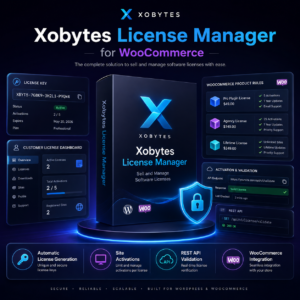
License manager for WooCommerce by XoBytes.com
$25.00
Xobytes License Manager for WooCommerce is a powerful WooCommerce license manager plugin that lets you sell software licenses,…

Agent Shield by XoBytes | Protect against agentic software
$25.00
AgentShield is a WordPress AI Agent Firewall that helps detect, monitor, block, and temporarily ban AI crawlers, AI…
Product 1 of 6
Comparing Off-the-Shelf Software Solutions
When comparing different off-the-shelf software solutions, consider creating a comparison matrix. This matrix can help visualize the strengths and weaknesses of each option based on critical factors:
Continue with Understanding Off-the-Shelf Software: Key Benefits and Use Cases for additional XoBytes guidance.
- Cost: List the initial costs, subscription fees, and any additional expenses for each software solution.
- Feature Set: Identify key features and functionalities that align with your business needs.
- User Experience: Assess user interface design and ease of use.
- Integration Capabilities: Evaluate how well each software integrates with your existing systems.
- Customer Support: Research the level of support offered, including availability, response times, and resources like documentation or community forums.
Implementation Best Practices
Once you have selected an off-the-shelf software solution, implementing it effectively is crucial for maximizing its benefits. Here are some best practices for a successful implementation:
- Develop a Clear Implementation Plan: Outline the steps, timelines, and responsibilities for the implementation process. Ensure all stakeholders are aware of their roles.
- Train Your Team: Provide comprehensive training to your team members. This will help them become proficient in using the new software and minimize resistance to change.
- Monitor Progress: Regularly check in on the implementation process. Gather feedback and address any challenges that arise promptly.
- Set Performance Metrics: Establish key performance indicators (KPIs) to measure the software’s impact on your business operations. This will help you evaluate its effectiveness over time.
Long-Term Considerations
While off-the-shelf software can provide immediate benefits, it’s essential to think about long-term implications as well. Here are some factors to keep in mind:
- Future Updates: Ensure the software vendor regularly updates the software to address security vulnerabilities, introduce new features, and improve functionality.
- Community and Support: A strong user community can provide additional resources, tips, and best practices. Look for software solutions with active forums or user groups.
- Adaptability: As your business evolves, assess whether the software can adapt to your changing needs. Consider the ease of upgrading or adding new features as necessary.
Case Studies of Successful Implementations
Understanding how other businesses have successfully implemented off-the-shelf software can provide valuable insights. Here are a few brief case studies:
- Company A: A small marketing agency implemented a CRM system to manage client relationships. By utilizing the software’s automation features, they reduced manual data entry by 40%, allowing the team to focus more on client engagement.
- Company B: A retail business adopted an inventory management solution that integrated with their existing e-commerce platform. This led to improved stock accuracy and reduced out-of-stock situations, resulting in a 15% increase in sales.
- Company C: A non-profit organization utilized project management software to streamline collaboration among volunteers. The software facilitated better communication and task tracking, enhancing overall project efficiency.
Frequently Asked Questions
Here are some common questions about off-the-shelf software:
What is off-the-shelf application software?
Off-the-shelf application software is pre-built, ready-made software designed to meet common business needs without customization, allowing quick deployment and cost-effective solutions.
What are the main advantages of using off-the-shelf software?
Its primary benefits include lower initial costs, faster implementation, widespread support, and proven reliability for standard business processes.
What are the limitations of off-the-shelf software?
Limitations include limited customization options, potential mismatch with specific business workflows, and possible scalability issues for unique or rapidly evolving needs.
How does off-the-shelf software compare to custom software development?
Off-the-shelf software offers quick deployment and lower costs, while custom software provides tailored solutions that better fit specific business requirements but involves higher investment and longer development time.