
In the digital age, managing software licenses effectively is crucial for any WooCommerce store selling digital products. Therefore, automating and securing software licenses can significantly enhance your operational efficiency and customer satisfaction. In this guide, we will explore how to automate and secure software licenses in WooCommerce using the best plugins and strategies available.
Understanding Software Licensing in WooCommerce
Software licensing refers to the process of managing the distribution and use of software products. In WooCommerce, this involves generating license keys, validating them, and ensuring compliance. As a result, effective license management is essential for protecting your digital products from unauthorized use.
Why Automate Software License Management?
Automating software license management offers several benefits:
- Efficiency: Automation reduces manual tasks, saving time and minimizing errors.
- Security: Automated systems ensure that license keys are generated and validated securely.
- Customer Experience: Quick and seamless delivery of license keys enhances customer satisfaction.
Top Plugins for Automating and Securing Software Licenses
To make this easier, here are some of the best plugins for automating and securing software licenses in WooCommerce:
For useful background on this topic, see How to Manage Software Licenses in WooCommerce: Top Plugins & Features.
1. License Manager for WooCommerce by XoBytes
This plugin allows you to sell software licenses, generate license keys, and manage them efficiently. Moreover, it integrates seamlessly with WooCommerce, ensuring a smooth experience for both you and your customers.
2. WooCommerce Software License Manager
Another excellent choice, this plugin provides comprehensive features for license key management, including generation, validation, and renewal. Also, it offers detailed reporting tools to track license usage.
3. Software License Manager for WooCommerce
This plugin focuses on automating the licensing process. It helps you create unique license keys and offers a user-friendly interface for managing them.
4. Easy Digital Downloads
While primarily an eCommerce solution, it includes powerful licensing features. This plugin is suitable for those who want to manage digital products alongside software licenses.
5. WooCommerce License Key Generator
As the name suggests, this plugin specializes in generating license keys. It ensures that each key is unique and can be validated automatically during the purchase process.
For a practical companion to this section, explore How to Automate WooCommerce Software Licensing: Top Plugins & Features for 2024.
Setting Up Your License Management System
To automate and secure software licenses in WooCommerce, follow these steps:
- Choose a Plugin: Select a plugin that fits your business needs.
- Install and Activate: Install the plugin through your WordPress dashboard and activate it.
- Configure Settings: Set up the plugin according to your requirements, including license key generation rules and validation settings.
- Test the System: Conduct a few test purchases to ensure everything works smoothly.
- Monitor and Optimize: Regularly check the system for any issues and optimize settings as needed.
Best Practices for Secure Software Licensing
Implementing best practices is vital for ensuring the security of your software licenses. Here are some key strategies:
- Use Strong License Keys: Generate complex license keys that are difficult to guess.
- Regular Validation: Ensure that licenses are validated at regular intervals to prevent unauthorized use.
- Monitor Usage: Keep track of how many times a license key has been used to identify potential misuse.
- Provide Clear Documentation: Offer customers clear instructions on how to use and activate their licenses.
Common Challenges in License Management
While automating and securing software licenses can streamline your operations, you may encounter some challenges:
- Integration Issues: Some plugins may not integrate well with existing WooCommerce setups.
- Customer Support: Providing timely support for license-related inquiries can be demanding.
- Compliance Monitoring: Ensuring that customers adhere to licensing agreements requires ongoing effort.
Conclusion
In conclusion, automating and securing software licenses in WooCommerce is essential for any store selling digital products. By using the right plugins and following best practices, you can protect your products, enhance customer satisfaction, and streamline your operations. Remember to regularly review your license management system to adapt to changing needs and technologies.
Related XoBytes Products
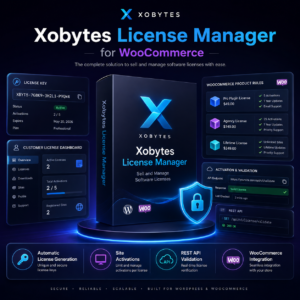
License manager for WooCommerce by XoBytes.com
$25.00
Xobytes License Manager for WooCommerce is a powerful WooCommerce license manager plugin that lets you sell software licenses,…

Tamper Guard by XoBytes | WordPress Plugin Tamper Detector
$25.00
Protect your commercial WordPress plugins with license-based tamper detection, file integrity monitoring, automatic shutdown protection, and site reporting.…

Plugin Update Server for WordPress by XoBytes.com
$25.00
Plugin Update Server by XoBytes lets WordPress plugin sellers deliver private plugin updates directly to customer dashboards. Upload…

Upgrades, Packages & Tiers for WooCommerce By XoBytes.com
$25.00
This is a FREEMIUM plugin. Get the free version “Upgrades, Packages & Tiers for WooCommerce By XoBytes.com” Pro…

Social Media Autopilot With AI by XoBytes.com
$19.99
Xobytes Social Autopilot is a WordPress social media autoposter that helps schedule and promote posts, pages, WooCommerce products,…

Agentic Consultant, Product Rep, & Customer Service Agent By XoBytes.com
$19.99
Agentic Consultant for WordPress gives your website a smart AI product rep, customer service agent, and hands-free voice…
Product 1 of 6
Implementing Advanced Security Measures
To further enhance the security of your software licenses in WooCommerce, consider implementing the following advanced security measures:
Continue with Best WooCommerce License Management Plugins for Secure Digital Sales for additional XoBytes guidance.
- Two-Factor Authentication (2FA): Require customers to verify their identity through a second method, such as a text message or authentication app, before accessing their license keys.
- IP Address Tracking: Monitor the IP addresses from which license keys are activated. This can help identify suspicious activity and prevent unauthorized access.
- License Key Expiration: Set expiration dates for license keys to ensure they are used within a specific timeframe, reducing the risk of long-term unauthorized usage.
Creating a Seamless Customer Experience
Ensuring a smooth and user-friendly experience for your customers is essential when managing software licenses. Here are some strategies to consider:
- Automated Email Notifications: Set up automated emails to notify customers when their license keys are generated, renewed, or close to expiration. This keeps them informed and engaged.
- User-Friendly License Management Dashboard: Provide customers with an easy-to-navigate dashboard where they can view their licenses, download products, and manage their account settings.
- Responsive Customer Support: Offer multiple channels for customer support, such as live chat, email, and phone support, to address any issues related to license management promptly.
Comparing License Management Plugins
When choosing a plugin for managing software licenses in WooCommerce, it’s essential to compare features, pricing, and support. Here’s a quick comparison of some popular options:
| Plugin Name | Key Features | Pricing | Support Options |
|---|---|---|---|
| License Manager for WooCommerce | License key generation, validation, reporting | $49/year | Email support, documentation |
| WooCommerce Software License Manager | Comprehensive license management, renewal options | $59/year | Live chat, email support |
| Software License Manager for WooCommerce | User-friendly interface, automated processes | $39/year | Documentation, community forums |
Steps to Troubleshoot License Management Issues
If you encounter issues with your license management system, follow these troubleshooting steps:
- Check Plugin Compatibility: Ensure that your license management plugin is compatible with your current version of WooCommerce and other installed plugins.
- Review Configuration Settings: Double-check your plugin settings to ensure that license key generation and validation rules are correctly configured.
- Test License Activation: Conduct a test purchase to see if the license key is generated and activated correctly. This can help identify any issues in the process.
- Consult Documentation: Refer to the plugin’s documentation for troubleshooting tips and common issues.
- Contact Support: If problems persist, reach out to the plugin’s support team for assistance.
Future Trends in Software Licensing
As technology evolves, so do the methods for managing software licenses. Here are some trends to watch for in the future:
- Blockchain Technology: Some companies are exploring blockchain for secure and transparent license management, potentially reducing fraud.
- Subscription-Based Licensing: More businesses are shifting towards subscription models, allowing customers to pay for licenses on a recurring basis rather than a one-time purchase.
- AI-Driven License Management: Artificial intelligence may play a role in automating and optimizing license management processes, improving efficiency and security.
Frequently Asked Questions
Here are some common questions regarding software license management in WooCommerce:
What is the best WooCommerce plugin for managing software licenses?
The best plugin depends on your specific needs, but popular options include License Manager for WooCommerce by XoBytes, which offers license key generation, validation, and management features.
How do license plugins improve digital product security?
License plugins help prevent unauthorized use by generating unique license keys, validating them at purchase, and monitoring license compliance, thereby protecting your digital assets.
Can license plugins integrate with existing WooCommerce setups?
Yes, most license management plugins are designed to seamlessly integrate with WooCommerce, allowing easy setup and management within your existing store environment.
Are license plugins suitable for digital software sales?
Absolutely, license plugins are specifically built to handle digital products like software, providing features such as license key delivery, validation, and renewal management.